
We've Launched a New Documentation Website (Beta Launch)

The documentation for DuitNow is now available on our newly launched documentation platform. This is an initial beta rollout of our new documentation site, designed to become the long-term home for all documentation moving forward.

You'll find the familiar content you're used to—now hosted on a new platform that will progressively receive updates and enhancements.

We encourage you to start accessing DuitNow materials there to explore the new experience and ensure you're viewing the latest documentation updates. If you have any feedback, please reach out to us.

Visit the New Documentation Website

Consent Registration after DuitNow Request & AutoDebit with Request-to-Pay

Successful Consent Registration after Coupled with Request to Pay – Consent Registration Flow
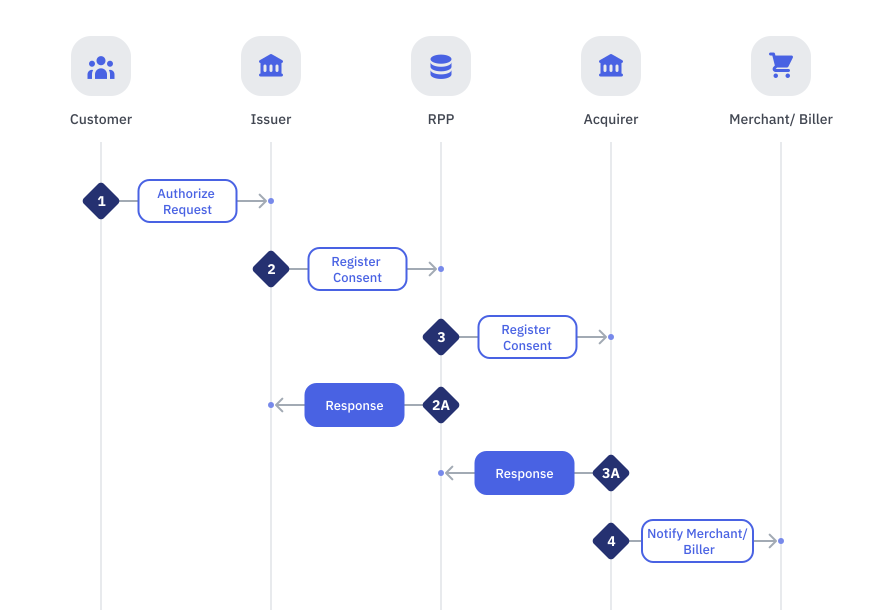
StepSenderReceiverProcess
1CustomerIssuerCustomer selects approves of Consent Registration
2IssuerRPP

Issuer will perform the following:

  • Authorize and validate Consent Registration request
  • Send Consent Registration request to RPP
  • Start timer

Note:

  • If customer selects multiple consent type, Issuer will send multiple Consent Registration requests
  • Transaction Type: 823

2ARPPIssuer

RPP performs the following

  • Message Logging
  • Message Validation
    • Message Format Validation
    • Digital Signature Validation
  • Business Validation
    • Timeout Validation
    • Transaction Type Validation
    • Date Expiry Check
    • Allowed Max Amount Validation

If any Message Validation fails, RPP will

  • Send a REJECT response to Issuer

If any Business Validation fails, RPP will

  • Send a NEGATIVE response to Issuer

If all validations are successful, RPP will

  • Create entry in Consent Table
  • Generate Consent ID
  • Set Consent Status to ACTV
  • Send an ACCEPTED response back to Merchant/Biller

Note:

  • Timeout is set at 20 seconds

3RPPAcquirer

RPP performs the following

  • Store Consent Registration request in SAF and begins submitting request to Acquirer
  • Check for retry necessity base on the following parameters:-
    • SAF Maximum Distribution Rate (msg/sec) aka TPS
    • SAF Message Response Timer (sec)
    • SAF Message Retry Limit
    • SAF Open Session Limit
    • SAF Timeout Count
    • SAF Pause Period (sec) after consecutive timeouts
  • If retry is required,
  • Send repeat Consent Registration Request to Issuer
  • Start timer

Note:

  • SAF will automatically send requests to Acquirer up to the number of maximum retry
  • Once maximum retry has been exceeded with no response, Participant must check the Exceptional SAF Report
  • Timeout is set at 20 seconds
  • Transaction Type: 823

3AAcquirerRPP

Acquirer performs the following

  • Message Validation
    • Message Format Validation
    • Digital Signature Validation
  • Business Validation
    • Mandatory and conditional fields validation
    • Merchant/ Biller Account Validation
    • Any other validation

If any Message Validation fails, Acquirer will

  • Send a REJECT response to RPP

If any Business Validation fails, Acquirer will

  • Send a NEGATIVE response to RPP

If all validations are successful, Acquirer will

  • Send a SUCCESSFUL response to RPP

Note:

  • Transaction Type: 823

4AcquirerMerchant / BillerAcquirer sends notification to Merchant/Biller about Consent Registration

The consent ID will be formatted based on the Merchant ID as well as a global running serial number. It will be at a length of 18 characters.
Examples
  1. Merchant A with ID MERAMYKL successfully registers a consent.

    Consent ID: MERAMYKL0000000001

  2. Merchant B with ID MERBMYKL successfully registers a consent.

    Consent ID: MERBMYKL0000000002

  3. Merchant A with ID MERAMYKL successfully registers another consent.

    Consent ID: MERAMYKL0000000003