Recurring or Scheduled Payment
Initiate AutoDebit Batch Files Processing
The DuitNow Pay Autodebit Batch feature supports the batch-file submission of multiple autodebit requests. It provides a scalable solution for acquirer handling recurring payments or subscription-based transactions, streamlining high-volume processing.
Process Flow
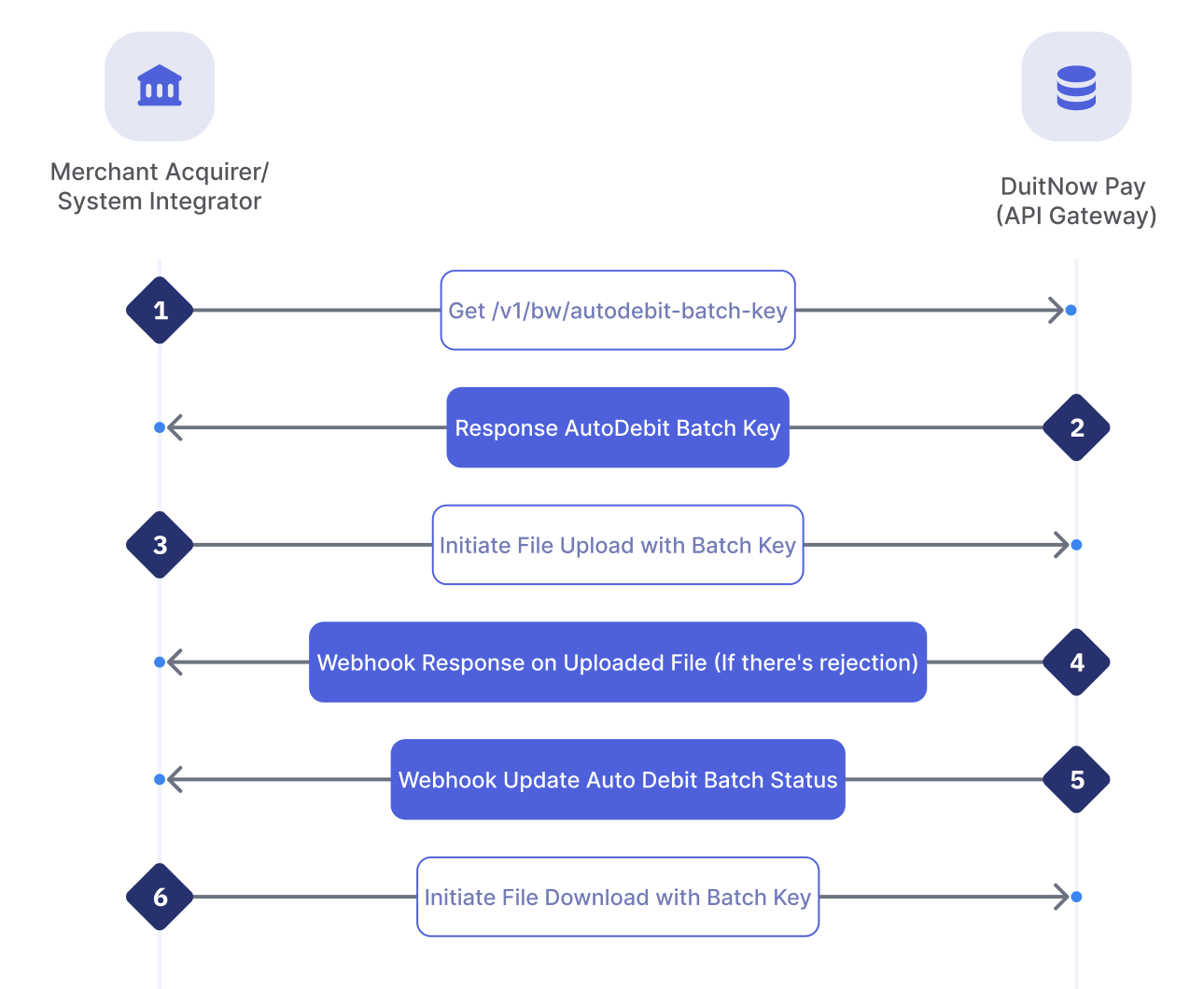
| Step | Sender | Receiver | Process |
|---|---|---|---|
| 1 | Acquirer / SI | API Gateway | Acquirer requests a temporary AutoDebit Batch Key via API. GET/v1/bw/autodebit-batch-key |
| 2 | API Gateway | Acquirer / SI | DuitNow Pay will return an AutoDebit Batch Key dedicated for participants and the key only valid for 1 hour. |
| 3 | Acquirer / SI | API Gateway | Acquirer will use the AutoDebit Batch Key and initiate file upload request based on the SDK code sample shared. To ensure the file is securely uploaded, participants will required to create a digital signature file
|
| 4 | API Gateway | API Gateway | DuitNow Pay API Gateway will validate the information inclusive of the file format and content inside the file. |
| 5 | API Gateway | Acquirer / SI | DuitNow Pay API Gateway will response back to Acquirer/ SI via webhook only if the uploaded file contains error. If the file validated success there will be no notifications. |
| 6 | API Gateway | Acquirer / SI | DuitNow Pay API Gateway will send a Webhook: Update AutoDebit Batch Status to the Acquirer/ SI to inform on the successful processed of the AutoDebit Batch files. Note:
|
| 7 | Acquirer / SI | API Gateway | Acquirer to use the AutoDebit Batch Key and initiate file download request based on the SDK code sample shared. If the AutoDebit Batch Key have expired, acquirer can perform another GET |
| 8 | Acquirer / SI | Merchant | Acquirer/ SI upon receiving the AutoDebit Batch status update and validated the response file, shall also update the information back to the merchant using their own specifications. |
Request AutoDebit Batch Temporary Key
Request
GET /v1/bw/autodebit-batch-key
Acquirer performs API request to obtain an AutoDebit batch key. The batch key provides temporary access to the Uploads and Downloads folders in the system. Each batch key only valid for 1 hour.
If the batch key expires, acquirer can call the same API to obtain an updated key.
Response
| accessKeyId | String | Max length: 20 | Required | |||
| Temporary AutoDebit Batch Credentials to access the folder. | ||||||
| secretAccessKey | String | Max length: 40 | Required | |||
| Temporary AutoDebit Batch Credentials to access the folder. | ||||||
| sessionToken | String | Max length: 1500 | Required | |||
| Temporary AutoDebit Batch Credentials to access the folder. | ||||||
| expiration | String | Max length: 20 | Required | |||
| Temporary AutoDebit Batch Credentials expiry date. | ||||||
| uploadTargetUrl | String | Max length: 256 | Required | |||
| The folder directory. This can be used to filled in the SDK Code during Upload and Download under column: BIC, SI, BUCKET, AWS_REGION. | ||||||
Sample Response:
{
  "accessKeyId": "AKIAIOSFODNN7EXAMPLE",
  "secretAccessKey": "wJalrXUtnFEMI/K7MDENG/bPxRfiCYEXAMPLEKEY",
  "sessionToken": "AQoDYXdzEJr...<remainder of token>",
  "expiration": "2026-05-20T08:00:00Z",
  "uploadTargetUrl": [
    "https://bucket.s3.ap-southeast-1.amazonaws.com/BICFI/SI/"
  ]
}
AutoDebit Batch Upload and Download Guide
To use the AutoDebit Batch feature, there’s certain crucial notes:
- Acquirer must upload files only to the Uploads folder as per format. Once file is validated or processed, system will place response files in the Downloads folder.
- Acquirer will initiate GET
/v1/bw/autodebit-batch-keyto obtain the temporary AutoDebit Batch Credentials. - Inside the
/v1/bw/autodebit-batch-keyresponse, acquirer will be able to get the details required for the upload and download SDK code. - The temporary AutoDebit Batch Credentials are assigned to each dedicated acquirer and used only for the designated bucket path.
The acquirer can connect using the following sample SDK code prepared:
The scripts in this guide automatically handle the folder hierarchy based on your BIC and SI.
- Logic: If the SI variable is left empty, the script defaults to use the BIC value as the Service Identifier folder.
- Target Path:
s3://paynet-autodebit-bucket/<BIC>/<SI>/Uploads/
Batch Upload
This section provides ready-to-use, integration-ready implementations for submitting batch files with signature files. Each script is designed to handle the end-to-end security workflow for an entire folder: scanning for .txt files, calculating integrity hashes, generating RS256-signed JWT signatures, and performing secure S3 uploads using temporary STS credentials.
Sample Java SDK Code
Requirements: Maven dependencies software.amazon.awssdk:s3 and io.jsonwebtoken:jwt.
import software.amazon.awssdk.auth.credentials.AwsSessionCredentials;
import software.amazon.awssdk.auth.credentials.StaticCredentialsProvider;
import software.amazon.awssdk.core.sync.RequestBody;
import software.amazon.awssdk.regions.Region;
import software.amazon.awssdk.services.s3.S3Client;
import software.amazon.awssdk.services.s3.model.PutObjectRequest;
import io.jsonwebtoken.Jwts;
import io.jsonwebtoken.SignatureAlgorithm;

import java.nio.file.*;
import java.security.*;
import java.security.spec.PKCS8EncodedKeySpec;
import java.util.*;

/**
 * PayNet Auto-Debit Batch Upload Reference Implementation
 * Instructions:
 * 1. Update the CONFIGURATION section below with your participant credentials.
 * 2. Ensure your private key is in PKCS#8 format.
 * 3. Ensure the 'my_batch_files' folder exists and contains .txt files.
 */
public class BatchSecurityFlow {
    // =========================================================================
    // CONFIGURATION - PARTICIPANT INPUT REQUIRED BELOW
    // =========================================================================
    private static final String BIC = "YOUR_BIC";
    private static final String SI = "";
    private static final String DATE = "YYYYMMDD";
    private static final String CONSUMER_KEY = "YOUR_CONSUMER_KEY";
    private static final String PRIVATE_KEY_PATH = "private_key.pem";
    private static final String BUCKET = "YOUR_BUCKET";
    private static final String FOLDER_PATH = "./my_batch_files"; // Path to .txt batch files

    // AWS Temporary Credentials (STS)
    private static final String AWS_ACCESS_KEY = "ASIA...";
    private static final String AWS_SECRET_KEY = "secret...";
    private static final String AWS_SESSION_TOKEN = "token...";
    // =========================================================================

    public static void main(String[] args) throws Exception {
        if (BIC.contains("YOUR_") || CONSUMER_KEY.contains("YOUR_")) {
            System.err.println("[!] ERROR: Please update the CONFIGURATION section with actual values.");
            System.exit(1);
        }

        Path folderPath = Paths.get(FOLDER_PATH);
        String effectiveSI = (SI == null || SI.trim().isEmpty()) ? BIC : SI;

        System.out.println("[*] Loading private key from: " + PRIVATE_KEY_PATH);
        String pem = new String(Files.readAllBytes(Paths.get(PRIVATE_KEY_PATH)))
                .replace("-----BEGIN PRIVATE KEY-----", "")
                .replace("-----END PRIVATE KEY-----", "")
                .replaceAll("\\s", "");
        byte[] encoded = Base64.getDecoder().decode(pem);
        PrivateKey pKey = KeyFactory.getInstance("RSA").generatePrivate(new PKCS8EncodedKeySpec(encoded));

        S3Client s3 = S3Client.builder()
                .region(Region.AP_SOUTHEAST_1)
                .credentialsProvider(StaticCredentialsProvider.create(
                    AwsSessionCredentials.create(AWS_ACCESS_KEY, AWS_SECRET_KEY, AWS_SESSION_TOKEN)))
                .build();

        try (DirectoryStream<Path> stream = Files.newDirectoryStream(folderPath, "*.txt")) {
            for (Path entry : stream) {
                String fileName = entry.getFileName().toString();
                System.out.println("[*] Processing: " + fileName);

                byte[] content = Files.readAllBytes(entry);
                MessageDigest digest = MessageDigest.getInstance("SHA-256");
                byte[] hash = digest.digest(content);
                String hexHash = HexFormat.of().formatHex(hash);

                String jwt = Jwts.builder()
                        .setHeaderParam("typ", "JWT")
                        .claim("key", CONSUMER_KEY)
                        .claim("iat", System.currentTimeMillis() / 1000)
                        .claim("jti", UUID.randomUUID().toString())
                        .claim("ds", hexHash)
                        .signWith(pKey, SignatureAlgorithm.RS256)
                        .compact();

                Path sigPath = entry.resolveSibling(fileName.substring(0, fileName.lastIndexOf('.')) + ".sig");
                Files.write(sigPath, jwt.getBytes());

                for (Path p : List.of(entry, sigPath)) {
                    String s3Key = BIC + "/" + effectiveSI + "/" + DATE + "/Uploads/" + p.getFileName();
                    s3.putObject(PutObjectRequest.builder().bucket(BUCKET).key(s3Key).build(),
                                 RequestBody.fromFile(p));
                    System.out.println("    [+] Uploaded: " + s3Key);
                }
            }
        } catch (NoSuchFileException e) {
            System.err.println("[!] ERROR: Folder '" + FOLDER_PATH + "' not found.");
        }

        System.out.println("[*] Batch process complete.");
    }
}
Sample Python SDK Code
Requirements: pip install boto3 PyJWT cryptography
import hashlib
import jwt
import time
import uuid
import boto3
import os
from pathlib import Path

# =========================================================================
# CONFIGURATION - PARTICIPANT INPUT REQUIRED BELOW
# =========================================================================
BIC = "YOUR_BIC"
SI = ""
DATE = "YYYYMMDD"
CONSUMER_KEY = "YOUR_CONSUMER_KEY"
PRIVATE_KEY_PATH = "private_key.pem"
FOLDER_PATH = "./my_batch_files" # Path to .txt batch files
BUCKET = "YOUR_BUCKET"
AWS_REGION = "ap-southeast-1"

STS_CREDS = {
    "accessKeyId": "ASIA...",
    "secretAccessKey": "secret...",
    "sessionToken": "token..."
}
# =========================================================================

def process_folder(folder_path: str, private_key_path: str):
    if BIC == "YOUR_BIC" or CONSUMER_KEY == "YOUR_CONSUMER_KEY":
        print("[!] ERROR: Please update the CONFIGURATION section with actual values.")
        return

    base_path = Path(folder_path)
    if not base_path.exists():
        print(f"[!] ERROR: Folder '{folder_path}' not found.")
        return

    effective_si = SI if SI.strip() else BIC

    s3 = boto3.client(
        's3',
        aws_access_key_id=STS_CREDS['accessKeyId'],
        aws_secret_access_key=STS_CREDS['secretAccessKey'],
        aws_session_token=STS_CREDS['sessionToken'],
        region_name=AWS_REGION
    )

    try:
        with open(private_key_path, "r") as f:
            private_key = f.read()
    except FileNotFoundError:
        print(f"[!] ERROR: Private key file not found at {private_key_path}")
        return

    for file_path in base_path.glob("*.txt"):
        print(f"[*] Processing: {file_path.name}")
        digest_hex = hashlib.sha256(file_path.read_bytes()).hexdigest()

        payload = {
            "key": CONSUMER_KEY,
            "iat": int(time.time()),
            "jti": str(uuid.uuid4()),
            "ds": digest_hex,
        }
        token = jwt.encode(payload, private_key, algorithm="RS256")

        sig_path = file_path.with_suffix(".sig")
        sig_path.write_text(token)

        for p in [file_path, sig_path]:
            s3_key = f"{BIC}/{effective_si}/{DATE}/Uploads/{p.name}"
            s3.upload_file(str(p), BUCKET, s3_key)
            print(f"    [+] Uploaded: {s3_key}")

if __name__ == "__main__":
    process_folder(FOLDER_PATH, PRIVATE_KEY_PATH)
    print("[*] Batch process complete.")
Sample TypeScript SDK Code
Requirements: npm install @aws-sdk/client-s3 jsonwebtoken
import * as fs from "fs";
import * as path from "path";
import * as crypto from "crypto";
import { S3Client, PutObjectCommand } from "@aws-sdk/client-s3";

// =========================================================================
// CONFIGURATION - PARTICIPANT INPUT REQUIRED BELOW
// =========================================================================
const BIC = "YOUR_BIC";
const SI = "";
const DATE = "YYYYMMDD";
const CONSUMER_KEY = "YOUR_CONSUMER_KEY";
const PRIVATE_KEY = "private_key.pem";
const FOLDER_PATH = "./my_batch_files";  // Path to .txt batch files
const BUCKET = "YOUR_BUCKET";
const REGION = "ap-southeast-1";

const STS_CREDS = {
  accessKeyId: "ASIA...",
  secretAccessKey: "secret...",
  sessionToken: "token...",
};
// =========================================================================

function base64url(input: Buffer | string) {
  const b = typeof input === "string" ? Buffer.from(input) : input;
  return b.toString("base64").replace(/=+$/, "").replace(/\+/g, "-").replace(/\//g, "_");
}

function signJwtRS256(payload: Record<string, unknown>, privateKeyPem: string) {
  const header = { alg: "RS256", typ: "JWT" };
  const encodedHeader = base64url(JSON.stringify(header));
  const encodedPayload = base64url(JSON.stringify(payload));
  const signingInput = `${encodedHeader}.${encodedPayload}`;

  const signer = crypto.createSign("RSA-SHA256");
  signer.update(signingInput);
  signer.end();
  const signature = signer.sign(privateKeyPem);
  return `${signingInput}.${base64url(signature)}`;
}

async function processFolder() {
  if (BIC.includes("YOUR_") || CONSUMER_KEY.includes("YOUR_")) {
    console.error("[!] ERROR: Please update the CONFIGURATION section with actual values.");
    process.exit(1);
  }

  if (!fs.existsSync(FOLDER_PATH)) {
    console.error(`[!] ERROR: Folder '${FOLDER_PATH}' not found.`);
    return;
  }

  const privateKeyPem = fs.readFileSync(PRIVATE_KEY, "utf8");
  const effectiveSI = SI.trim() || BIC;
  const files = fs.readdirSync(FOLDER_PATH).filter((f) => f.endsWith(".txt"));

  const s3 = new S3Client({
    region: REGION,
    credentials: {
      accessKeyId: STS_CREDS.accessKeyId,
      secretAccessKey: STS_CREDS.secretAccessKey,
      sessionToken: STS_CREDS.sessionToken,
    },
  });

  for (const fileName of files) {
    const filePath = path.join(FOLDER_PATH, fileName);
    const fileContent = fs.readFileSync(filePath);
    console.log(`[*] Processing: ${fileName}`);

    const hash = crypto.createHash("sha256").update(fileContent).digest("hex");
    const payload = {
      key: CONSUMER_KEY,
      iat: Math.floor(Date.now() / 1000),
      jti: crypto.randomUUID(),
      ds: hash,
    };
    const token = signJwtRS256(payload, privateKeyPem);

    const sigPath = filePath.replace(".txt", ".sig");
    fs.writeFileSync(sigPath, token);

    for (const p of [filePath, sigPath]) {
      const currentName = path.basename(p);
      const s3Key = `${BIC}/${effectiveSI}/${DATE}/Uploads/${currentName}`;

      await s3.send(
        new PutObjectCommand({
          Bucket: BUCKET,
          Key: s3Key,
          Body: fs.readFileSync(p),
        }),
      );
      console.log(`    [+] Uploaded: ${s3Key}`);
    }
  }

  console.log("[*] Batch process complete.");
}

processFolder().catch((err) => {
  console.error("[!] Fatal Error:", err.message);
});
Sample Go SDK Code
Requirements:
go get [github.com/golang-jwt/jwt/v5](https://github.com/golang-jwt/jwt/v5)go get [github.com/google/uuid](https://github.com/google/uuid)go get [github.com/aws/aws-sdk-go-v2](https://github.com/aws/aws-sdk-go-v2)
package main

import (
    "context"
    "crypto/sha256"
    "encoding/hex"
    "fmt"
    "os"
    "path/filepath"
    "strings"
    "time"

    "github.com/aws/aws-sdk-go-v2/config"
    "github.com/aws/aws-sdk-go-v2/credentials"
    "github.com/aws/aws-sdk-go-v2/service/s3"
    "github.com/golang-jwt/jwt/v5"
    "github.com/google/uuid"
)

// =========================================================================
// CONFIGURATION - PARTICIPANT INPUT REQUIRED BELOW
// =========================================================================
const (
    BIC             = "YOUR_BIC"
    SI              = ""
    DATE            = "YYYYMMDD"
    CONSUMER_KEY    = "YOUR_CONSUMER_KEY"
    PRIVATE_KEY_PATH = "private_key.pem"
    FOLDER_PATH     = "./my_batch_files" // Path to .txt batch files
    BUCKET          = "YOUR_BUCKET"
    REGION          = "ap-southeast-1"
    AWS_ACCESS_KEY  = "ASIA..."
    AWS_SECRET_KEY  = "secret..."
    AWS_SESSION_TOKEN = "token..."
)
// =========================================================================

func main() {
    if strings.Contains(BIC, "YOUR_") || strings.Contains(CONSUMER_KEY, "YOUR_") {
        fmt.Println("[!] ERROR: Please update the CONFIGURATION section with actual values.")
        os.Exit(1)
    }

    effectiveSI := SI
    if effectiveSI == "" {
        effectiveSI = BIC
    }

    staticCreds := credentials.NewStaticCredentialsProvider(AWS_ACCESS_KEY, AWS_SECRET_KEY, AWS_SESSION_TOKEN)
    awsCfg, err := config.LoadDefaultConfig(context.TODO(),
        config.WithCredentialsProvider(staticCreds),
        config.WithRegion(REGION),
    )
    if err != nil {
        fmt.Printf("[!] ERROR: Unable to load AWS config: %v\n", err)
        return
    }
    client := s3.NewFromConfig(awsCfg)

    keyBytes, err := os.ReadFile(PRIVATE_KEY_PATH)
    if err != nil {
        fmt.Printf("[!] ERROR: Failed to read private key: %v\n", err)
        return
    }
    pKey, err := jwt.ParseRSAPrivateKeyFromPEM(keyBytes)
    if err != nil {
        fmt.Printf("[!] ERROR: Failed to parse RSA private key: %v\n", err)
        return
    }

    files, err := os.ReadDir(FOLDER_PATH)
    if err != nil {
        fmt.Printf("[!] ERROR: Folder '%s' not found: %v\n", FOLDER_PATH, err)
        return
    }

    for _, f := range files {
        if f.IsDir() || !strings.HasSuffix(f.Name(), ".txt") {
            continue
        }

        filePath := filepath.Join(FOLDER_PATH, f.Name())
        data, _ := os.ReadFile(filePath)
        hash := sha256.Sum256(data)
        digestHex := hex.EncodeToString(hash[:])

        token := jwt.NewWithClaims(jwt.SigningMethodRS256, jwt.MapClaims{
            "key": CONSUMER_KEY,
            "iat": time.Now().Unix(),
            "jti": uuid.New().String(),
            "ds":  digestHex,
        })
        signedJWT, err := token.SignedString(pKey)
        if err != nil {
            fmt.Printf("    [!] Error signing JWT: %v\n", err)
            continue
        }

        sigPath := strings.TrimSuffix(filePath, ".txt") + ".sig"
        os.WriteFile(sigPath, []byte(signedJWT), 0644)

        for _, target := range []string{filePath, sigPath} {
            fileHandle, err := os.Open(target)
            if err != nil {
                continue
            }

            s3Key := fmt.Sprintf("%s/%s/%s/Uploads/%s", BIC, effectiveSI, DATE, filepath.Base(target))
            _, err = client.PutObject(context.TODO(), &s3.PutObjectInput{
                Bucket: &[]string{BUCKET}[0],
                Key:    &s3Key,
                Body:   fileHandle,
            })

            if err == nil {
                fmt.Printf("    [+] Uploaded: %s\n", s3Key)
            } else {
                fmt.Printf("    [!] Upload failed for %s: %v\n", target, err)
            }
            fileHandle.Close()
        }
    }

    fmt.Println("[*] Batch process complete.")
}
Batch Download
This section provides ready-to-use implementations for the secure retrieval and verification of batch files. These scripts automate the downstream workflow: scanning for paired data and signature files,authenticating the package integrity via JWT decoding, and performing cryptographic validationto ensure the downloaded content has not been tampered with.
Sample Java SDK Code
import java.io.*;
import java.nio.file.*;
import java.security.MessageDigest;
import java.util.Base64;
import java.util.regex.Matcher;
import java.util.regex.Pattern;

public class BatchSecurityFlowDownload {
    // =========================================================================
    // CONFIGURATION - PARTICIPANT INPUT REQUIRED BELOW
    // =========================================================================
    private static final String BIC = "YOUR_BIC";
    private static final String SI = ""; // leave empty to use BIC
    private static final String DATE = "YYYYMMDD";
    private static final String BUCKET = "YOUR_BUCKET";
    // =========================================================================

    public static void main(String[] args) throws Exception {
        String effectiveSI = SI.isEmpty() ? BIC : SI;
        Path downloadsDir = Paths.get(BUCKET, BIC, effectiveSI, DATE, "Downloads");
        System.out.println("[*] Verifying files from: " + downloadsDir);

        if (!Files.isDirectory(downloadsDir)) {
            System.out.println("[!] ERROR: Folder not found: " + downloadsDir);
            return;
        }

        int pass = 0, fail = 0;
        try (DirectoryStream<Path> ds = Files.newDirectoryStream(downloadsDir, "*.txt")) {
            for (Path file : ds) {
                System.out.println("[*] Verifying: " + file.getFileName());
                String hash = hashFileStreaming(file);
                Path sig = Paths.get(file.toString().replaceAll("\\.txt$", "") + ".sig");
                if (!Files.exists(sig)) { System.out.println("    [!] Missing .sig file"); fail++; continue; }

                String jwt = new String(Files.readAllBytes(sig)).trim();
                String dsClaim = extractDsFromJwt(jwt);
                if (dsClaim == null) { System.out.println("    [!] Could not extract ds claim"); fail++; continue; }

                if (hash.equals(dsClaim)) { System.out.println("    [+] PASS: Hash matches"); pass++; } else {
                    System.out.println("    [!] FAIL: Hash mismatch\n       Expected: " + dsClaim + "\n       Got:      " + hash);
                    fail++;
                }
            }
        }

        System.out.printf("\n[*] Verification complete. Passed: %d, Failed: %d\n", pass, fail);
    }

    private static String hashFileStreaming(Path file) throws Exception {
        MessageDigest md = MessageDigest.getInstance("SHA-256");
        try (InputStream in = Files.newInputStream(file)) {
            byte[] buf = new byte[32*1024];
            int n;
            while ((n = in.read(buf)) > 0) { md.update(buf, 0, n); }
        }
        return bytesToHex(md.digest());
    }

    private static final char[] HEX_ARRAY = "0123456789abcdef".toCharArray();
    private static String bytesToHex(byte[] bytes) {
        char[] hexChars = new char[bytes.length * 2];
        for (int j = 0; j < bytes.length; j++) {
            int v = bytes[j] & 0xFF;
            hexChars[j * 2] = HEX_ARRAY[v >>> 4];
            hexChars[j * 2 + 1] = HEX_ARRAY[v & 0x0F];
        }
        return new String(hexChars);
    }

    // Minimal extraction: decode payload (second dot part) and parse ds value via regex
    private static String extractDsFromJwt(String jwt) {
        String[] parts = jwt.split("\\.");
        if (parts.length != 3) return null;
        String payload = parts[1];
        // pad
        int mod = payload.length() % 4; if (mod != 0) payload += "=".repeat(4 - mod);
        try {
            byte[] decoded = Base64.getUrlDecoder().decode(payload);
            String json = new String(decoded, java.nio.charset.StandardCharsets.UTF_8);
            Pattern p = Pattern.compile("\"ds\"\s*:\s*\"([0-9a-fA-F]+)\"");
            Matcher m = p.matcher(json);
            if (m.find()) return m.group(1);
        } catch (IllegalArgumentException e) { return null; }
        return null;
    }
}
Sample Python SDK Code
import hashlib
import base64
import json
from pathlib import Path

# =========================================================================
# CONFIGURATION - PARTICIPANT INPUT REQUIRED BELOW
# =========================================================================
BIC = "YOUR_BIC"
SI = ""
DATE = "YYYYMMDD"
BUCKET = "YOUR_BUCKET"
# =========================================================================

if not SI:
    SI = BIC

downloads_dir = Path(BUCKET) / BIC / SI / DATE / "Downloads"
print(f"[*] Verifying files from: {downloads_dir}\n")

passed = 0
failed = 0

for p in downloads_dir.glob('*.txt'):
    print(f"[*] Verifying: {p.name}")
    # streaming hash
    h = hashlib.sha256()
    with p.open('rb') as f:
        for chunk in iter(lambda: f.read(32*1024), b""):
            h.update(chunk)
    got = h.hexdigest()

    sig_path = p.with_suffix('')  # removes .txt
    sig_path = sig_path.with_suffix('.sig')
    try:
        jwt = sig_path.read_text().strip()
    except Exception as e:
        print(f"    [!] Error reading signature file: {e}")
        failed += 1
        continue

    parts = jwt.split('.')
    if len(parts) != 3:
        print("    [!] Invalid JWT format")
        failed += 1
        continue

    payload = parts[1]
    padding = '=' * (-len(payload) % 4)
    payload += padding
    try:
        decoded = base64.urlsafe_b64decode(payload)
        obj = json.loads(decoded)
        ds = obj.get('ds')
        if not ds:
            print("    [!] 'ds' not found in payload")
            failed += 1
            continue
        if got == ds:
            print("    [+] PASS: Hash matches")
            passed += 1
        else:
            print(f"    [!] FAIL: Hash mismatch\n       Expected: {ds}\n       Got:      {got}")
            failed += 1
    except Exception as e:
        print(f"    [!] Error decoding payload: {e}")
        failed += 1

print(f"\n[*] Verification complete. Passed: {passed}, Failed: {failed}")
Sample TypeScript SDK Code
import { createReadStream, readdirSync, readFileSync } from 'fs';
import { createHash } from 'crypto';
import { join } from 'path';

// =========================================================================
// CONFIGURATION - PARTICIPANT INPUT REQUIRED BELOW
// =========================================================================
const BIC = 'YOUR_BIC';
let SI = '';
const DATE = 'YYYYMMDD';
const BUCKET = 'YOUR_BUCKET';
if (!SI) SI = BIC;
// =========================================================================

const downloadsPath = join(BUCKET, BIC, SI, DATE, 'Downloads');
console.log(`[*] Verifying files from: ${downloadsPath}\n`);

let pass = 0, fail = 0;
for (const name of readdirSync(downloadsPath)) {
  if (!name.endsWith('.txt')) continue;
  console.log(`[*] Verifying: ${name}`);
  const filePath = join(downloadsPath, name);
  const sigPath = filePath.replace(/\.txt$/, '.sig');

  const hash = awaitHash(filePath);
  let jwt: string;
  try { jwt = readFileSync(sigPath, 'utf8').trim(); } catch (e) { console.log('    [!] Error reading .sig file'); fail++; continue; }

  const parts = jwt.split('.');
  if (parts.length !== 3) { console.log('    [!] Invalid JWT format'); fail++; continue; }

  let payload = parts[1];
  const pad = payload.length % 4; if (pad) payload += '='.repeat(4 - pad);
  const payloadBuf = Buffer.from(payload, 'base64url');
  try {
    const obj = JSON.parse(payloadBuf.toString('utf8')) as any;
    const ds = obj.ds as string | undefined;
    if (!ds) { console.log("    [!] 'ds' not found"); fail++; continue; }
    if (ds === hash) { console.log('    [+] PASS: Hash matches'); pass++; } else { console.log(`    [!] FAIL: Hash mismatch\n       Expected: ${ds}\n       Got:      ${hash}`); fail++; }
  } catch (e) { console.log('    [!] Error decoding payload'); fail++; }
}
console.log(`\n[*] Verification complete. Passed: ${pass}, Failed: ${fail}`);

function awaitHash(filePath: string): Promise<string> {
  return new Promise((resolve, reject) => {
    const h = createHash('sha256');
    const rs = createReadStream(filePath, { highWaterMark: 32 * 1024 });
    rs.on('data', (chunk) => h.update(chunk));
    rs.on('end', () => resolve(h.digest('hex')));
    rs.on('error', reject);
  });
}
Sample Go SDK Code
package main

import (
    "crypto/sha256"
    "encoding/hex"
    "encoding/base64"
    "encoding/json"
    "fmt"
    "io"
    "os"
    "path/filepath"
    "strings"
)

// =========================================================================
// CONFIGURATION - PARTICIPANT INPUT REQUIRED BELOW
// =========================================================================
const (
    BIC    = "YOUR_BIC"
    SI     = ""
    DATE   = "YYYYMMDD"
    BUCKET = "YOUR_BUCKET"
)
// =========================================================================

func main() {
    effectiveSI := SI
    if effectiveSI == "" { effectiveSI = BIC }

    downloadsPath := filepath.Join(BUCKET, BIC, effectiveSI, DATE, "Downloads")
    fmt.Printf("[*] Verifying files from: %s\n\n", downloadsPath)

    files, err := os.ReadDir(downloadsPath)
    if err != nil {
        fmt.Printf("[!] ERROR: Folder '%s' not found: %v\n", downloadsPath, err)
        return
    }

    passCount, failCount := 0, 0

    for _, f := range files {
        if f.IsDir() || !strings.HasSuffix(f.Name(), ".txt") { continue }
        filePath := filepath.Join(downloadsPath, f.Name())
        sigPath := strings.TrimSuffix(filePath, ".txt") + ".sig"

        fmt.Printf("[*] Verifying: %s\n", f.Name())

        // streaming hash
        h, err := hashFileStreaming(filePath)
        if err != nil { fmt.Printf("    [!] Error hashing file: %v\n", err); failCount++; continue }

        // read .sig and decode payload (no signature verification)
        sigBytes, err := os.ReadFile(sigPath)
        if err != nil { fmt.Printf("    [!] Error reading signature file: %v\n", err); failCount++; continue }

        parts := strings.Split(string(sigBytes), ".")
        if len(parts) != 3 { fmt.Printf("    [!] Invalid JWT format\n"); failCount++; continue }

        payload := parts[1]
        if m := len(payload) % 4; m != 0 { payload += strings.Repeat("=", 4-m) }
        payloadBytes, err := base64.URLEncoding.DecodeString(payload)
        if err != nil { fmt.Printf("    [!] Error decoding JWT payload: %v\n", err); failCount++; continue }

        var payloadMap map[string]interface{}
        if err := json.Unmarshal(payloadBytes, &payloadMap); err != nil { fmt.Printf("    [!] Error parsing JWT payload JSON: %v\n", err); failCount++; continue }

        stored, ok := payloadMap["ds"].(string)
        if !ok { fmt.Printf("    [!] Error: Could not extract 'ds' claim from JWT\n"); failCount++; continue }

        if h == stored { fmt.Printf("    [+] PASS: Hash matches\n"); passCount++ } else { fmt.Printf("    [!] FAIL: Hash mismatch\n       Expected: %s\n       Got:      %s\n", stored, h); failCount++ }
    }

    fmt.Printf("\n[*] Verification complete. Passed: %d, Failed: %d\n", passCount, failCount)
}

func hashFileStreaming(filePath string) (string, error) {
    f, err := os.Open(filePath)
    if err != nil { return "", err }
    defer f.Close()

    h := sha256.New()
    buf := make([]byte, 32*1024)
    for {
        n, err := f.Read(buf)
        if err != nil && err != io.EOF { return "", err }
        if n == 0 { break }
        h.Write(buf[:n])
    }
    return hex.EncodeToString(h.Sum(nil)), nil
}
Webhook: Update AutoDebit Batch Processing Status
Request
Webhook endpoint will be provided by acquirer during onboarding.
Data Object | ||||||
| request_filename | String | Max length: 255 | Required | |||
Name of the file that used for AutoDebit Batch request. Acquirer required to follow specific file name format: {BICFI}/{ENTITY}/{yyyyMMdd}/Uploads/{BICFI}_{MID}_{PID}_{yyyyMMdd}_{hhmmss}_{nnn}.txt | ||||||
| response_filename | String | Max length: 255 | Required | |||
Name of the file after validations or processed. Type of response file name format as below: {BICFI}/{ENTITY}/{yyyyMMdd}/Downloads/{BICFI}_{MID}_{PID}_{yyyyMMdd}_{hhmmss}_{nnn}_PROCESSED.txt{BICFI}/{ENTITY}/{yyyyMMdd}/Downloads/{BICFI}_{MID}_{PID}_{yyyyMMdd}_{hhmmss}_{nnn}_R.txt{BICFI}/{ENTITY}/{yyyyMMdd}/Downloads/{BICFI}_{MID}_{PID}_{yyyyMMdd}_{hhmmss}_{nnn}_ERROR.txt | ||||||
| total_records | Integer | Max length: 10 | Required | |||
| Total number of records inside the files. Each of the files can hold up to 500 records. | ||||||
| successful_records | Integer | Max length: 10 | Required | |||
| Total number of records that successfully processed. | ||||||
| failed_records | Integer | Max length: 10 | Required | |||
| Total number of records that failed to process. | ||||||
| status | String | Max length: 50 | Required | |||
Autodebit batch status: IN_PROGRESS - PendingCOMPLETED - Processed FAILED - Rejected due to validation fails | ||||||
End Data Object | ||||||
| message | String | Max length: 1024 | Required | |||
| Processed: OK Rejected: Meaningful error message | ||||||
Sample Request:
{
  "data": {
    "request_filename": "MYBIC8XX/MYBIC8XX/20250127/Uploads/MYBIC8XX_M0012345_P00000234_20250127_063000_001.txt",
    "response_filename": "MYBIC8XX/MYBIC8XX/20250127/Downloads/MYBIC8XX_M0012345_P00000234_20250127_063000_001_R.txt",
    "total_records": 500,
    "successful_records": 499,
    "failed_records": 1,
    "status": "COMPLETED"
  },
  "message": "OK"
}
Enquire AutoDebit Batch Status
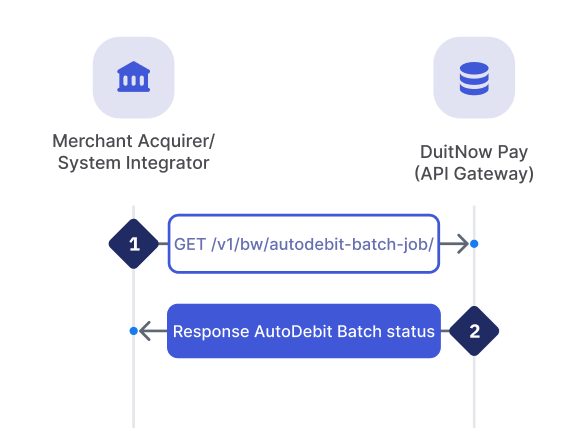
Retrieves the status of the AutoDebit Batch that has previously been created. Parse in the unique jobId and PayNet will return the corresponding status on the AutoDebit Batch.
Acquirer can use this API to retrieve the AutoDebit Batch status, 60 minutes after uploaded the file.
| Step | Sender | Receiver | Process |
|---|---|---|---|
| 1 | Acquirer / SI | API Gateway | Acquirer/ SI initiates an enquiry via unique JobId for the status of the AutoDebit Batch. |
| 2 | API Gateway | Acquirer / SI | DuitNow Pay API Gateway will locate the AutoDebit Batch status and response back to Acquirer/ SI. |
Request
GET /v1/bw/autodebit-batch-job/01998592-9440-7409-be84-55438ccfced6
This API has a rate limit, therefore can only be called once every 30 seconds for each transaction.
| jobId | String | Max length: 36 | Required | |||
| The unique external identifier (uuid v7) provided by the acquirer to PayNet when sending an AutoDebit request file. | ||||||
Response
Data Object | ||||||
| requestFilename | String | Max length: 255 | Required | |||
Name of the file that used for AutoDebit Batch request. Acquirer required to follow specific file name format: {BICFI}/{ENTITY}/{yyyyMMdd}/Uploads/{BICFI}_{MID}_{PID}_{yyyyMMdd}_{hhmmss}_{nnn}.txt | ||||||
| responseFilename | String | Max length: 255 | Required | |||
Name of the file after validations or processed. Type of response file name format as below: {BICFI}/{ENTITY}/{yyyyMMdd}/Downloads/{BICFI}_{MID}_{PID}_{yyyyMMdd}_{hhmmss}_{nnn}_PROCESSED.txt{BICFI}/{ENTITY}/{yyyyMMdd}/Downloads/{BICFI}_{MID}_{PID}_{yyyyMMdd}_{hhmmss}_{nnn}_R.txt{BICFI}/{ENTITY}/{yyyyMMdd}/Downloads/{BICFI}_{MID}_{PID}_{yyyyMMdd}_{hhmmss}_{nnn}_ERROR.txt | ||||||
| totalCount | Integer | Max length: 10 | Required | |||
| Total number of records inside the files. Each of the files can hold up to 500 records. | ||||||
| successfulCount | Integer | Max length: 10 | Required | |||
| Total number of records that successfully processed. | ||||||
| failedCount | Integer | Max length: 10 | Required | |||
| Total number of records that failed to process. | ||||||
| status | String | Max length: 50 | Required | |||
Autodebit batch status: IN_PROGRESS - PendingCOMPLETED - Processed FAILED - Rejected due to validation fails | ||||||
End Data Object | ||||||
| message | String | Max length: 1024 | Required | |||
| Found: OK Not found: Cannot find autodebit_batch_job with jobId: {jobId} | ||||||
Sample Response:
{
  "data": {
    "requestFilename": "MYBIC8XX/MYBIC8XX/20250127/Uploads/MYBIC8XX_M0012345_P00000234_20250127_063000_001.txt",
    "responseFilename": "MYBIC8XX/MYBIC8XX/20250127/Downloads/MYBIC8XX_M0012345_P00000234_20250127_063000_001_R.txt",
    "totalCount": 500,
    "successfulCount": 499,
    "failedCount": 1,
    "status": "COMPLETED"
  },
  "message": "OK"
}
Batch File Format
Request File
Header Section
| Field Name | Format | Length | Remarks |
|---|---|---|---|
| RECORD TYPE | Numeric | 2 |
|
| REPORT DATE | Numeric | 8 |
|
| JOB ID | Alphanumeric | 36 |
|
Body Section
| Field Name | Format | Length | Remarks |
|---|---|---|---|
| RECORD TYPE | Numeric | 2 |
|
| CHECKOUTID | Alphanumeric | 36 |
|
| CONSENTID | Alphanumeric | 35 |
|
| AMOUNT | Alphanumeric | 18 |
|
| REFERENCE | Alphanumeric | 140 |
|
Footer Section
| Field Name | Format | Length | Remarks |
|---|---|---|---|
| RECORD TYPE | Numeric | 2 |
|
| TOTAL RECORD COUNT | Numeric | 5 |
|
Sample File
01|20250926|01998592-9440-7409-be84-55438ccfced6
02|01998592-9440-70a6-a810-651e5ed0cf24|M00123450011650448|1000.00|Reference
02|01998592-9440-7dd9-927b-8eaecb155f35|M00123450011650448|1001.00|Reference
03|2
Acquirers must comply with the required validation rules for request file specified below.
| No | Description | File Naming | Format | Frequency |
|---|---|---|---|---|
| 1 | Request File
|
Example: MYBIC8XX_M0012345_P00000234_20250127_063000_001.txt | Txt | Daily - Before 12am Upload the file daily before 12am, only files contain today’s date will be processed, files with future or past dates will be rejected. |
Response File
- If the request file formatting is wrong, it will be rejected by appending
_ERROR.txtat the end of the filename. - If validation fails or the file is rejected, the header and body will remain identical to the original request file, with an enhanced footer and an added error details section.
Header Section
| Field Name | Format | Length | Remarks |
|---|---|---|---|
| RECORD TYPE | Numeric | 2 |
|
| REPORT DATE | Numeric | 8 |
|
| JOB ID | Alphanumeric | 36 |
|
Body Section
| Field Name | Format | Length | Remarks |
|---|---|---|---|
| RECORD TYPE | Numeric | 2 |
|
| BIZMSGIDR | Alphanumeric | 35 |
|
| CHECKOUTID | Alphanumeric | 36 |
|
| CONSENTID | Alphanumeric | 35 |
|
| AMOUNT | Alphanumeric | 18 |
|
| REFERENCE | Alphanumeric | 140 |
|
| STATUS | Alphanumeric | 4 |
|
| STATUSCODE | Alphanumeric | 36 |
|
| ISSUER | Alphanumeric | 8 |
|
Footer Section
| Field Name | Format | Length | Remarks |
|---|---|---|---|
| RECORD TYPE | Numeric | 2 |
|
| TOTAL RECORD COUNT | Numeric | 5 |
|
| SUCCESS COUNT | Numeric | 5 |
|
| ERROR COUNT | Numeric | 5 |
|
| STATUS | Alphanumeric | 36 |
|
Error Details Section
| Field Name | Format | Length | Remarks |
|---|---|---|---|
| RECORD TYPE | Numeric | 2 |
|
| ERROR LEVEL | Numeric | 2 |
|
| CHECKOUTID | Alphanumeric | 36 |
|
| ERROR CODE | Alphanumeric | 36 |
|
| ERROR MESSAGE | Alphanumeric | 255 |
|
Sample File
COMPLETE_SUCCESS
01|20250926|01998592-9440-7409-be84-55438ccfced6
02|20250926M0012345220OBW00000001|01998592-9440-70a6-a810-651e5ed0cf24|M00123450011650448|1000.00|Reference|ACSP|U000|ISSBICXX
02|20250926M0012345220OBW00000002|01998592-9440-7dd9-927b-8eaecb155f35|M00123450011650448|1000.00|Reference|ACSP|U000|ISSBICXX
03|2|2|0|COMPLETE_SUCCESS
COMPLETE_SUCCESS (with rejected processed transaction)
01|20250926|01998592-9440-7409-be84-55438ccfced6
02|20250926M0012345220OBW00000001|01998592-9440-70a6-a810-651e5ed0cf24|M00123450011650448|1000.00|Reference|ACSP|U000|ISSBICXX
02||01998592-9440-7dd9-927b-8eaecb155f35|M00123450011650448|1000.01|Reference|RJCT|U902|
03|2|1|1|COMPLETE_SUCCESS
04|02|01998592-9440-7dd9-927b-8eaecb155f35|U902|Connection Or Communication Error
COMPLETE_FAILURE (Rejected Request File - File Name)
01|20250926|01998592-9440-7409-be84-55438ccfced6
02|01998592-9440-70a6-a810-651e5ed0cf24|M00123450011650448|1000.00|Reference
02|01998592-9440-7dd9-927b-8eaecb155f35|M00123450011650448|1000.01|Reference
03|2|0|2|COMPLETE_FAILURE
04|00||ER_BICFI_MISMATCH|BICFI mismatch. Filename: MYABC8XX, S3 path: MYBIC8XX
COMPLETE_FAILURE (Rejected Request File - File Body)
01|20250926|01998592-9440-7409-be84-55438ccfced6
02|01998592-9440-70a6-a810-651e5ed0cf24|M00123450011650448|1000.00|Reference
02|01998592-9440-7dd9-927b-8eaecb155f35||1000.01|Reference
03|2|0|2|COMPLETE_FAILURE
04|02|01998592-9440-7dd9-927b-8eaecb155f35|ER_FIELD_VALIDATION|ConsentId is required at line 3
COMPLETE_FAILURE (Rejected Request File - File Footer)
01|20250926|01998592-9440-7409-be84-55438ccfced6
02|01998592-9440-70a6-a810-651e5ed0cf24|M00123450011650448|1000.00|Reference
02|01998592-9440-7dd9-927b-8eaecb155f35|M00123450011650448|1000.01|Reference
03|2|0|2|COMPLETE_FAILURE
04|03||ER_FILE_FOOTER|Record count is required at line 4
Below are clarifications of the file name the acquirer will see when you perform an enquiry or after the file is validated or processed.
| No | Description | File Naming | Format | Frequency |
|---|---|---|---|---|
| 1 | Request File - File processing
|
Example: MYBIC8XX_M0012345_P00000234_20250127_063000_001_PROCESSED.txt | Txt | 60 minutes after file is being uploaded |
| 2 | Response File - Processed successfully
|
Example: MYBIC8XX_M0012345_P00000234_20250127_063000_001_R.txt | Txt | Daily - 08:00am |
| 3 | Response File - Processed failed
|
Example: MYBIC8XX_M0012345_P00000234_20250127_063000_001_ERROR.txt | Txt | Daily - 08:00am |
YAML Tool Kit
Want to play around before creating a full-stack application for AutoDebit Batch? We’ve prepared the YAML specification reference for you to copy and set it up in your environment to try out.
Below contains the YAML specification for the following endpoints:
/v1/bw/autodebit-batch-job/{jobId}/v1/bw/autodebit-batch-key
openapi: 3.0.3
info:
  title: DNP Batch API
  version: 1.0.0
  description: OpenAPI spec for Autodebit Batch endpoints

servers:
  - url: https://api.{environment}.inet.duitnowpay.my:8443
    description: Non-Production Environments
    variables:
      environment:
        default: sit
        enum:
          - sit
          - uat
        description: Target gateway environment.

security:
  - BearerAuth: []

paths:
  # =========================================================
  # Request for Autodebit Batch Job Status
  # =========================================================
  /v1/bw/autodebit-batch-job/{jobId}:
    get:
      summary: Get autodebit batch job by jobId
      tags:
        - Autodebit Batch Job
      parameters:
        - name: jobId
          in: path
          required: true
          description: UUID of the autodebit batch job
          schema:
            type: string
            format: uuid
      responses:
        '200':
          description: OK - autodebit batch job found
          content:
            application/json:
              schema:
                $ref: '#/components/schemas/AutodebitBatchJobEnvelope'
              examples:
                success:
                  value:
                    data:
                      requestFilename: "DMM1MYKL/RNGPAY/20260507/Uploads/DMM1MYKL_M0037091_P00038064_20260507_074751_001.txt"
                      responseFilename: "DMM1MYKL/RNGPAY/20260507/Downloads/DMM1MYKL_M0037091_P00038064_20260507_074751_001_R.txt"
                      totalCount: 1
                      successfulCount: 1
                      failedCount: 0
                      status: "COMPLETED"
                    message: "OK"
        '404':
          description: Not Found - jobId does not exist
          content:
            application/json:
              schema:
                $ref: '#/components/schemas/AutodebitBatchJobEnvelope'
              examples:
                notFound:
                  value:
                    data: null
                    message: "Cannot find autodebit_batch_job with jobId: 00000000-0000-0000-0000-000000000000"
        '400':
          description: Bad Request - invalid jobId format or merchant validation failed
          content:
            application/json:
              schema:
                $ref: '#/components/schemas/ErrorResponse'
              examples:
                invalidUuid:
                  value:
                    message: "Invalid UUID format for jobId: not-a-uuid"
        '500':
          description: Internal Server Error
          content:
            application/json:
              schema:
                $ref: '#/components/schemas/ErrorResponse'

  # =========================================================
  # Request for Temporary Batch Key
  # =========================================================
  /v1/bw/autodebit-batch-key:
    get:
      summary: Retrieve temporary S3 credentials for autodebit batch uploads
      description: Returns STS temporary credentials and upload target URL(s).
      tags:
        - Autodebit Batch Key
      responses:
        '200':
          description: STS credentials response
          content:
            application/json:
              schema:
                $ref: '#/components/schemas/StsCredentialsResponse'
        '401':
          description: Unauthorized - merchant-product mapping missing
          content:
            application/json:
              schema:
                $ref: '#/components/schemas/ErrorResponse'
        '404':
          description: Not Found - consumer has no path mapping
          content:
            application/json:
              schema:
                $ref: '#/components/schemas/ErrorResponse'
              examples:
                notFound:
                  value:
                    message: "Consumer not found or has no path mapping"
        '500':
          description: Internal server error
          content:
            application/json:
              schema:
                $ref: '#/components/schemas/ErrorResponse'
        '502':
          description: Bad Gateway - failed to communicate with AWS STS
          content:
            application/json:
              schema:
                $ref: '#/components/schemas/ErrorResponse'
              examples:
                stsError:
                  value:
                    message: "Failed to communicate with authentication service"

components:
  # =========================================================
  # Security Schemes
  # =========================================================
  securitySchemes:
    BearerAuth:
      type: http
      scheme: bearer
      bearerFormat: JWT
      description: Input your JWT access token (exclude 'Bearer' prefix).

  schemas:
    # =========================================================
    # Autodebit Batch Job Schemas
    # =========================================================
    AutodebitBatchJobEnquiryResponse:
      type: object
      properties:
        requestFilename:
          type: string
        responseFilename:
          type: string
          nullable: true
        totalRecordCount:
          type: integer
          format: int32
        successCount:
          type: integer
          format: int32
        errorCount:
          type: integer
          format: int32
        status:
          type: string
      required:
        - requestFilename
        - totalRecordCount
        - status

    AutodebitBatchJobEnvelope:
      type: object
      properties:
        data:
          nullable: true
          allOf:
            - $ref: '#/components/schemas/AutodebitBatchJobEnquiryResponse'
        message:
          type: string
      required:
        - message

    # =========================================================
    # Temporary Batch Key Schemas
    # =========================================================
    StsCredentialsResponse:
      type: object
      properties:
        accessKeyId:
          type: string
          example: AKIAIOSFODNN7EXAMPLE
        secretAccessKey:
          type: string
          example: wJalrXUtnFEMI/K7MDENG/bPxRfiCYEXAMPLEKEY
        sessionToken:
          type: string
          example: AQoDYXdzEJr...<remainder of token>
        expiration:
          type: string
          description: Expiration timestamp (ISO-8601 string)
          example: '2026-05-20T08:00:00Z'
        uploadTargetUrls:
          type: array
          items:
            type: string
            format: uri
          description: Target URLs for uploading batch files
          example:
            - https://bucket.s3.ap-southeast-1.amazonaws.com/BICFI/SI/
      required:
        - accessKeyId
        - secretAccessKey
        - sessionToken
        - expiration
        - uploadTargetUrls

    ErrorResponse:
      type: object
      properties:
        message:
          type: string
          example: "An error occurred processing the request."
      required:
        - message