
We've Launched a New Documentation Website (Beta Launch)

The documentation for DuitNow is now available on our newly launched documentation platform. This is an initial beta rollout of our new documentation site, designed to become the long-term home for all documentation moving forward.

You'll find the familiar content you're used to—now hosted on a new platform that will progressively receive updates and enhancements.

We encourage you to start accessing DuitNow materials there to explore the new experience and ensure you're viewing the latest documentation updates. If you have any feedback, please reach out to us.

Visit the New Documentation Website

Consumer Presented Mode: Domestic QR

End-to-End Flow

Successful End-to-End Consumer-Presented QR Flow
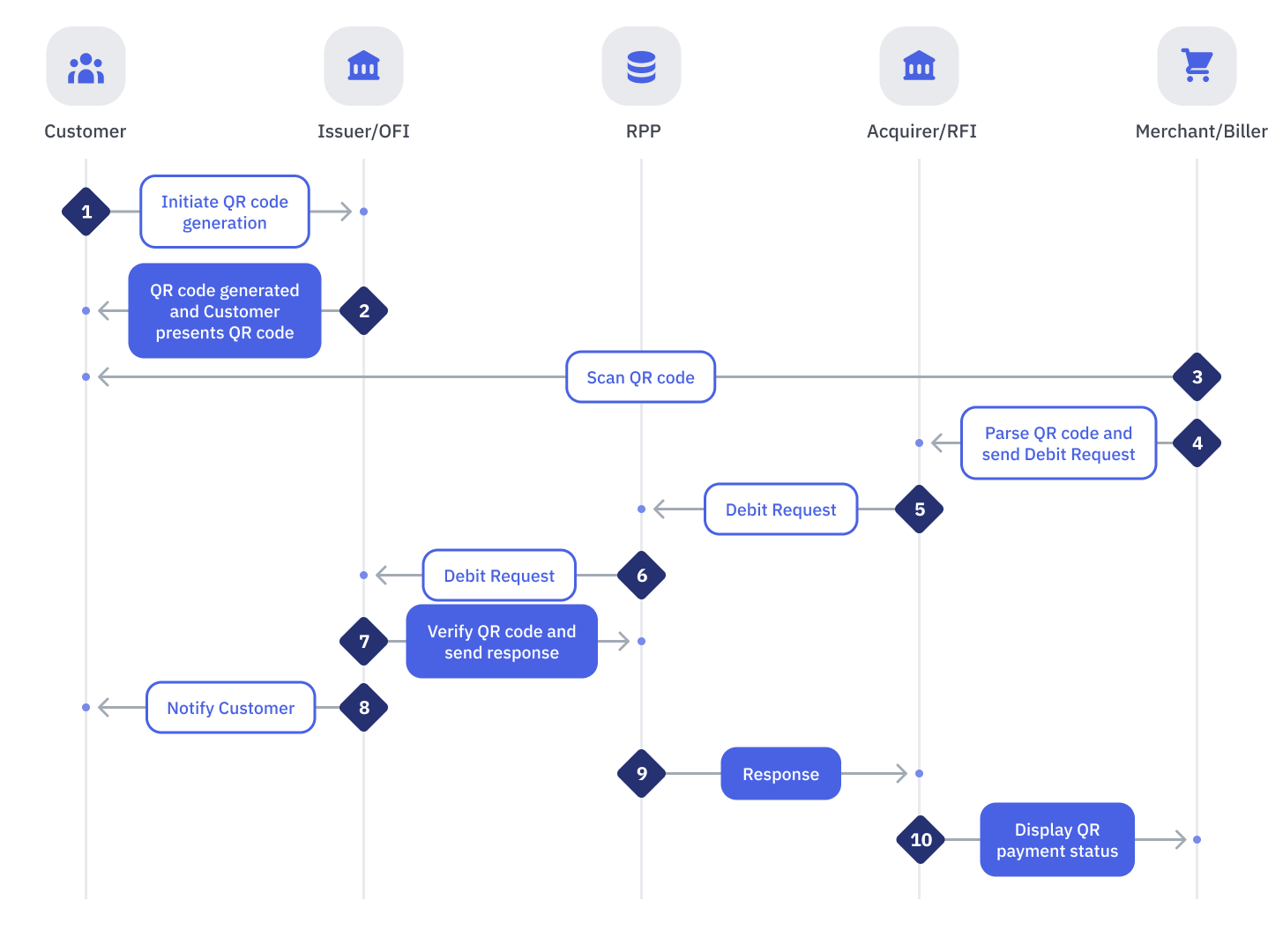
Successful End-to-End Consumer-Presented QR Flow

StepSenderReceiverProcess
1CustomerIssuerCustomer logs into Online Banking or Mobile Banking app and initiates a QR code generation
2IssuerCustomerIssuer generates a QR code and Customer presents the generated QR to Merchant
3MerchantAcquirerMerchant scans the QR code presented by the Customer
4MerchantAcquirerMerchant initiates QR Debit request
5AcquirerRPPAcquirer performs the following:
  • Authorize and validate the QR Debit transaction
  • Parse the QR code to extract
    • Application Identifier (AID)
    • Issuer ID
    • Type of Source of Funds
  • Validate Type of Source of Funds against Merchant's Acceptable Source of Funds
  • Any internal validations.
If all validations are successful:
  • If AID belongs to PayNet, Issuer will:
    • For On-Us Customer
      • NOT route the request to RPP
    • For Off-Us Customer
      • Send QR Debit request to RPP
  • If AID does not belongs to PayNet, Issuer will:
    • Send QR Debit request to RPP
6RPPIssuerRPP performs the following:If any of the Message Validations fails:
  • Return a REJECT response to Acquirer
If any of the Business Validations fails:
  • Return a NEGATIVE response to Acquirer
If all validations are successful:
  • Send QR Debit message request
7IssuerRPPRFI performs the following:If any of the Message Validations fails:
  • Send a REJECT response
If any of the Business Validations fails:
  • Send a NEGATIVE response
If any of the Beneficiary Account Validations fails:
  • Send a NEGATIVE response
If all validations are successful:
  • Debit fund from customer account
  • Send QR Debit message response
8IssuerCustomerIssuer notifies Customer on QR payment status
9RPPAcquirerRPP performs the following:If any of the Message Validations fails:
  • Send a REJECT response
If any of the Business Validations fails:
  • Send a NEGATIVE response
If all validations are successful:
  • Update liquidity and settlement positions of both Issuer and Acquirer
  • Send QR Debit request message response
Notes:
If the signature received from Issuer could not be verified:
  • RPP will send an ACCEPTED (signature error) response to the Acquirer if the Issuer responds with a SUCCESSFUL transaction status
  • RPP will send an actual REJECT response to the Acquirer if Issuer responds with a REJECT transaction status
This should take care of any message manipulation done within the data when a signature could not be verified
10AcquirerMerchantAcquirer performs the following:If all validations are successful:
  • If SUCCESSFUL response is received:
    • Credit to Merchant
    • Display the final payment status to the Customer
  • If UNSUCCESSFUL response is received:
    • Display an error message to the Customer

Pre-Authorization and QR Debit Request Flow
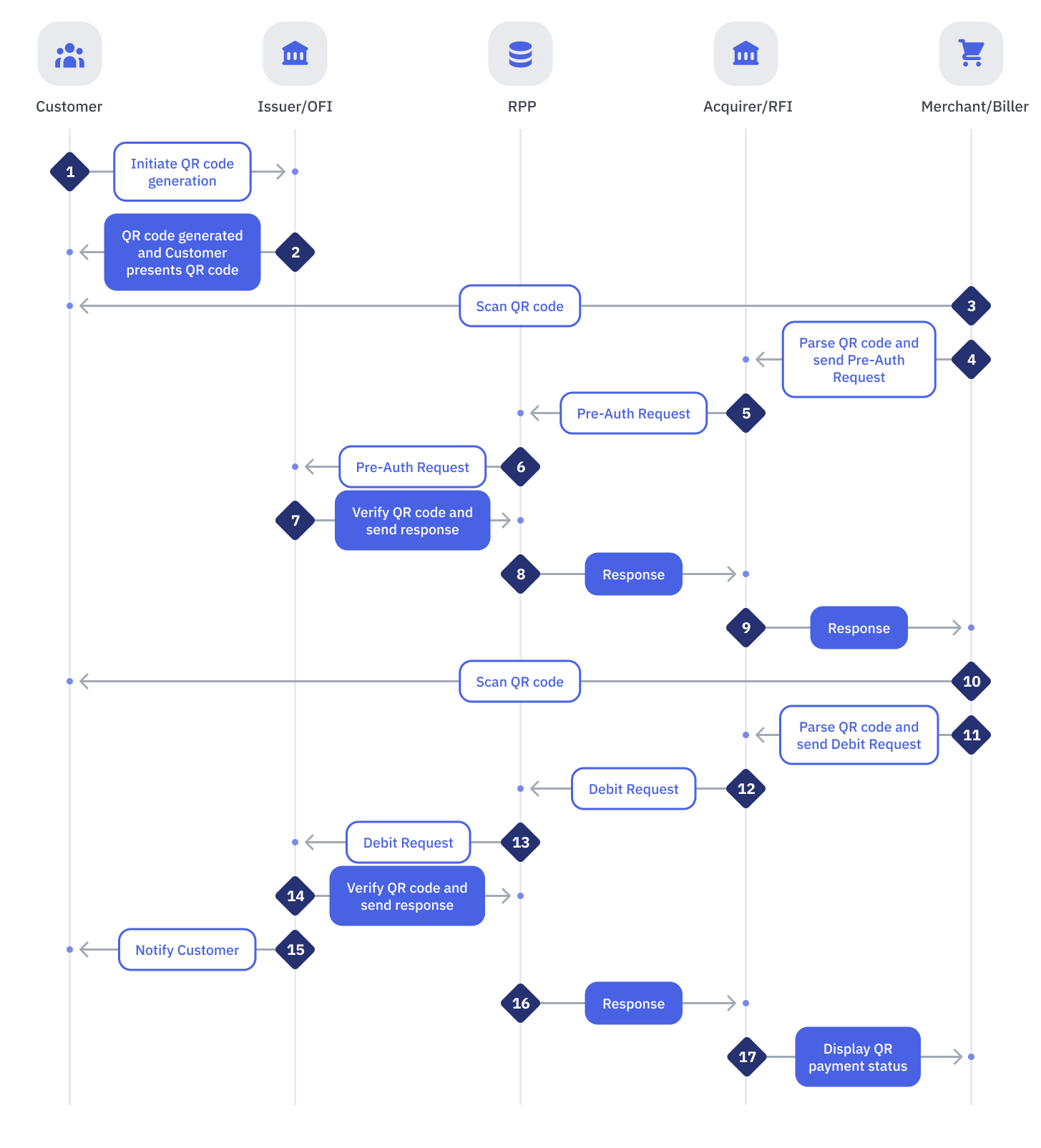
Successful End-to-End Pre-Authorization and QR Debit Request Flow

StepSenderReceiverProcess
1CustomerIssuerCustomer logs into Online Banking or Mobile Banking app and initiates a QR code generation
2IssuerCustomerIssuer generates a QR code and Customer presents the generated QR to Merchant
3MerchantAcquirerMerchant scans the QR code presented by the Customer
4MerchantAcquirerMerchant initiates QR Debit request
5AcquirerRPPAcquirer performs the following:
  • Authorize and validate the QR Debit transaction
  • Parse the QR code to extract
    • Application Identifier (AID)
    • Issuer ID
    • Type of Source of Funds
  • Validate Type of Source of Funds against Merchant's Acceptable Source of Funds
  • Any internal validations.
If all validations are successful:
  • If AID belongs to PayNet, Issuer will:
    • For On-Us Customer
      • NOT route the request to RPP
    • For Off-Us Customer
      • Send QR Debit request to RPP
      • Transaction type : 880
      • Start timer
  • If AID does not belongs to PayNet, Issuer will:
    • Send QR Debit request to RPP
    • Transaction type : 881
    • Start timer

Notes:

  • Send QR Debit request to RPP
  • Transaction type : 881
  • Start timer

6RPPIssuerRPP performs the following:If any of the Message Validations fails:
  • Return a REJECT response to Acquirer
If any of the Business Validations fails:
  • Return a NEGATIVE response to Acquirer
If all validations are successful:
  • Generate Pre-authorization ID
  • Send Pre-Authorization message request with the generated Pre-authorization ID
7IssuerRPPRFI performs the following:If any of the Message Validations fails:
  • Send a REJECT response
If any of the Business Validations fails:
  • Send a NEGATIVE response
If any of the Beneficiary Account Validations fails:
  • Send a NEGATIVE response
If all validations are successful:
  • Pre-authorize Customer account
8RPPAcquirerRPP performs the following:If any of the Message Validations fails:
  • Send a REJECT response
If any of the Business Validations fails:
  • Send a NEGATIVE response
If all validations are successful:
  • Send Pre-Authorization message response with Pre-authorization ID
Notes:
If the signature received from Issuer could not be verified:
  • RPP will send an ACCEPTED (signature error) response to the Acquirer if the Issuer responds with a SUCCESSFUL transaction status
  • RPP will send an actual REJECT response to the Acquirer if Issuer responds with a REJECT transaction status
This should take care of any message manipulation done within the data when a signature could not be verified
9AcquirerMerchantAcquirer performs the following:If all validations are successful:
  • If SUCCESSFUL response is received:
    • Display the final payment status to the Customer
  • If UNSUCCESSFUL response is received:
    • Display an error message to the Customer
10MerchantAcquirerMerchant scans the QR code presented by the Customer
11MerchantAcquirerMerchant initiates QR Debit request
12AcquirerRPPAcquirer performs the following:
  • Authorize and validate the QR Debit transaction
  • Parse the QR code to extract
    • Application Identifier (AID)
    • Issuer ID
    • Type of Source of Funds
  • Validate Type of Source of Funds against Merchant's Acceptable Source of Funds
  • Any internal validations.
If all validations are successful:
  • If AID belongs to PayNet, Issuer will:
    • For On-Us Customer
      • NOT route the request to RPP
    • For Off-Us Customer
      • Send QR Debit request to RPP
  • If AID does not belongs to PayNet, Issuer will:
    • Send QR Debit request to RPP
13RPPIssuerRPP performs the following:If any of the Message Validations fails:
  • Return a REJECT response to Acquirer
If any of the Business Validations fails:
  • Return a NEGATIVE response to Acquirer
If all validations are successful:
  • Send QR Debit message request
14IssuerRPPRFI performs the following:If any of the Message Validations fails:
  • Send a REJECT response
If any of the Business Validations fails:
  • Send a NEGATIVE response
If any of the Beneficiary Account Validations fails:
  • Send a NEGATIVE response
If all validations are successful:
  • Release pre-authorized amount and debit fund from customer account
  • Send QR Debit message response
15IssuerCustomerIssuer notifies Customer on QR payment status
16RPPAcquirerRPP performs the following:If any of the Message Validations fails:
  • Send a REJECT response
If any of the Business Validations fails:
  • Send a NEGATIVE response
If all validations are successful:
  • Update liquidity and settlement positions of both Issuer and Acquirer
  • Send QR Debit request message response
Notes:
If the signature received from Issuer could not be verified:
  • RPP will send an ACCEPTED (signature error) response to the Acquirer if the Issuer responds with a SUCCESSFUL transaction status
  • RPP will send an actual REJECT response to the Acquirer if Issuer responds with a REJECT transaction status
This should take care of any message manipulation done within the data when a signature could not be verified
17AcquirerMerchantAcquirer performs the following:If all validations are successful:
  • If SUCCESSFUL response is received:
    • Credit to Merchant
    • Display the final payment status to the Customer
  • If UNSUCCESSFUL response is received:
    • Display an error message to the Customer

Exception Flows

Issuer Failed to Receive Request from RPP
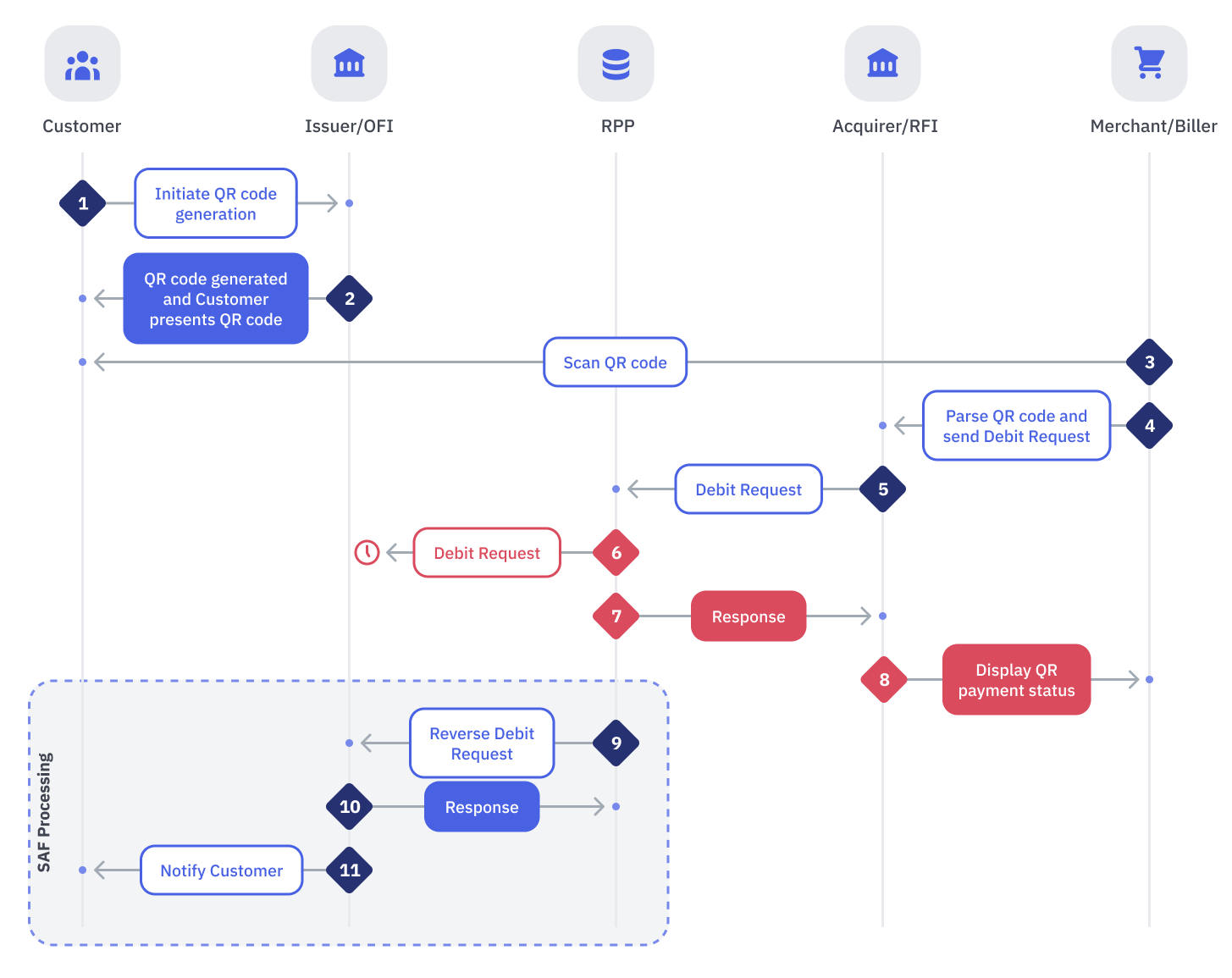
Issuer Failed to Receive Request from RPP

ConditionActionsAlternatives
RPP sent a request to Issuer, and Issuer did receive the request. However, Issuer response did not reach to RPP

As no response is received from Issuer after x period of time, RPP eventually timeout
RPP shall:
  • Timeout
  • Send a Debit Cancellation request
OFI shall:
  • Display an appropriate error message to the Customer
  • Stop processing
-