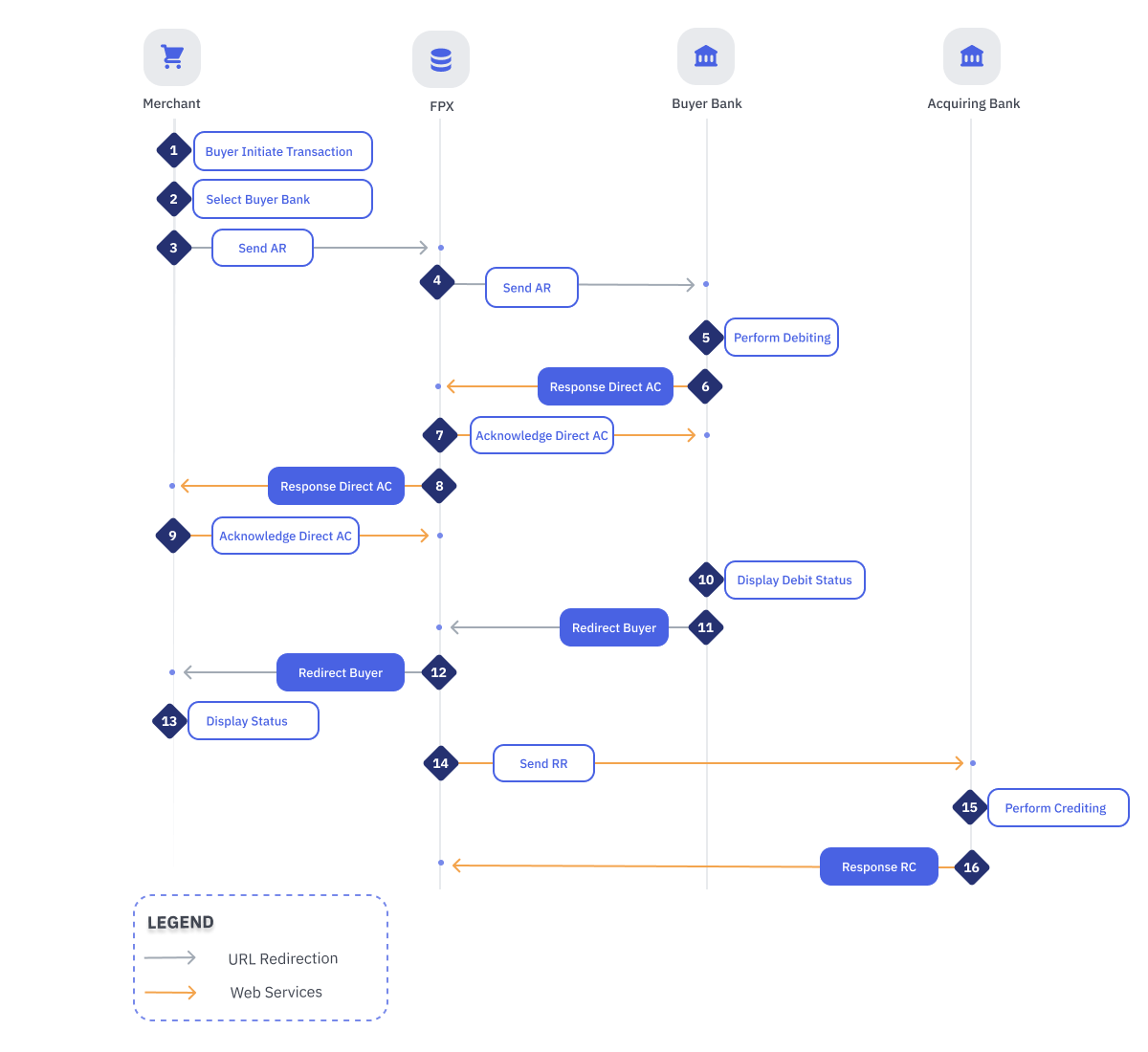
| 1 | Buyer Initiate Transaction | Buyer access Merchant website to purchase either goods or services, and proceed with payment. |
| 2 | Buyer Select Buyer Bank | Once Buyer selects “Pay via FPX” as his payment option, Buyer may selects his preferred Bank from the drop down list. |
| 3 | Merchant Send AR Message to FPX | Merchant sends AR message to FPX via SSL. |
| 4 | FPX Send AR Message to Buyer Bank | FPX redirects Buyer to chosen Bank’s Internet Banking Login page. During this redirection, FPX send AR message to Bank’s Internet Banking. |
| 5 | Buyer Bank Perform Debiting | Upon Buyer successful login to the Bank’s Internet Banking, Buyer authorize the payment by confirming the transaction details and complying with Bank’s two factor authentication method. |
| 6 | Buyer Bank Respond Direct AC Message to FPX | Bank sends Direct AC message to FPX. |
| 7 | FPX Send Acknowledgment of Direct AC to Buyer Bank | FPX send acknowledgement message to Buyer Bank. |
| 8 | FPX Respond Direct AC Message to Merchant | FPX performs the following tasks: - Send host to host Direct AC response status message to Merchant website
- Send email notification to Merchant
- Send email notification to Buyer.
FPX will resend numbers of Direct AC whenever Merchant does not acknowledge Direct AC message to FPX. |
| 9 | Merchant Send Acknowledgment of Direct AC Message to FPX | Based on received Direct AC message, Merchant needs to respond with 'OK' message. |
| 10 | Buyer Bank Display Debit Status | Bank displays the payment status to Buyer. In addition, Bank instructs Buyer to click the “Continue with transaction” button. |
| 11 | Buyer Bank Redirect Buyer to FPX | Bank redirects Buyer to FPX. During this redirection, Bank send Indirect AC message to FPX. |
| 12 | FPX Redirect Buyer to Merchant Website | FPX redirects Buyer to Merchant website. During this redirection, FPX send Indirect AC message to the Merchant website. |
| 13 | Merchant Display Status to Buyer | Merchant displays transaction status page to Buyer. |
| 14 | FPX Send RR Message to Acquiring Bank | Upon completion of the debit cycle, FPX initiates RR message to Acquiring Bank. |
| 15 | Acquiring Bank Perform Crediting | Acquiring Bank processes credit message and performs crediting to Merchant account. |
| 16 | Acquiring Bank Responds RC Message to FPX | Acquiring Bank updates credit status to FPX by sending RC message. Once credit response message is received, FPX update the transaction as completed and ready for interbank settlement. |