Overview
Certificate Authority
DuitNow v3 Production Certificate Requirements
Only certificates issued by Certificate Authorities (CAs) licensed by the Malaysian Communications and Multimedia Commission (MCMC) are accepted. Certificates issued by third-party or non-MCMC-licensed CAs will not be accepted.
The certificate must use:
- SHA-256 with 2048-bit key — Recommended minimum
- SHA-512 with 4096-bit key — Recommended
Cerfiticate Management
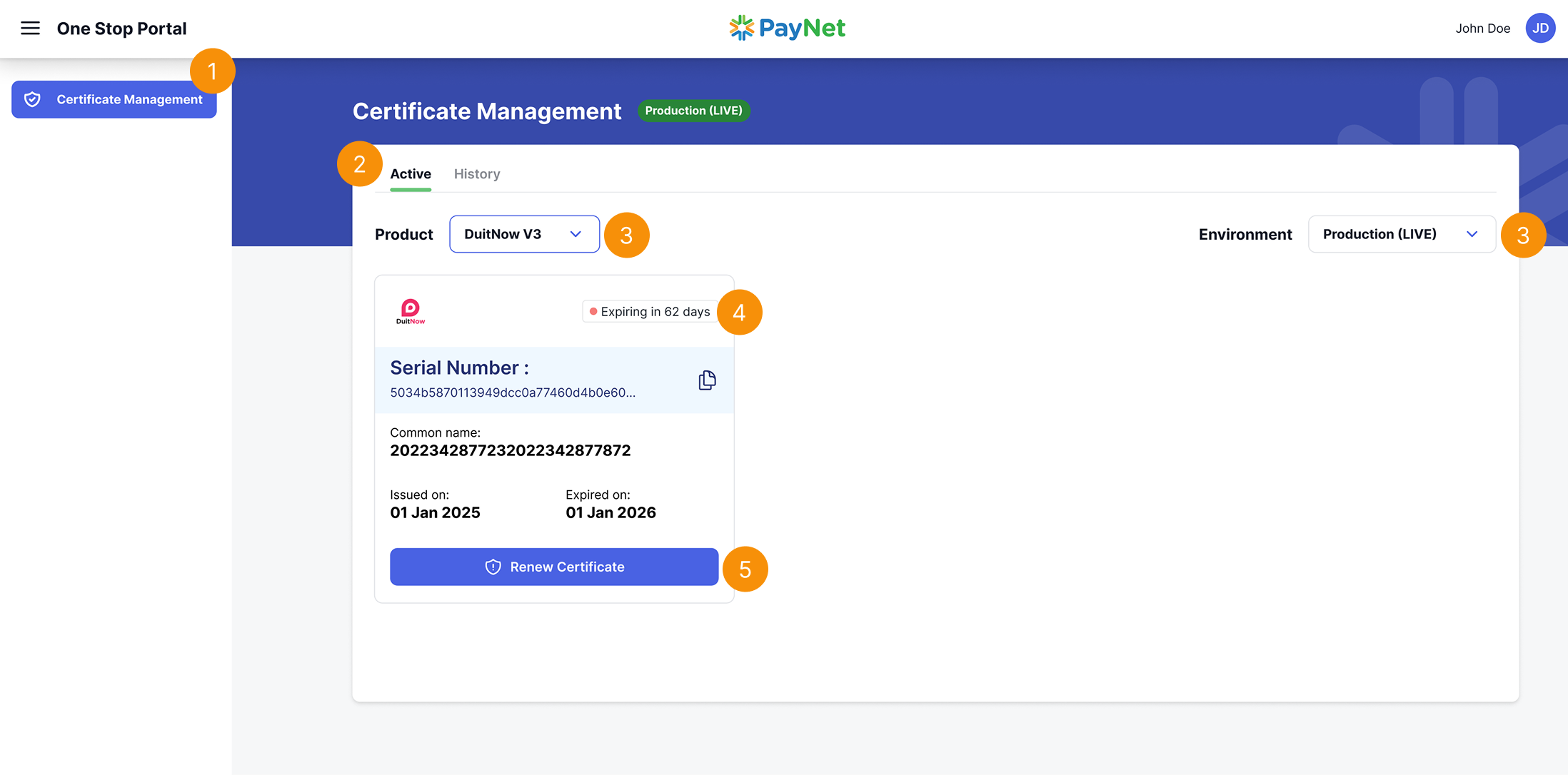
- Select the "Certificate Management"
- Select 'Active' tab
- Select product "DuitNow V3" and environment "Product (Live)".
- Identify certificates with expiring orexpired indicator;
- Expiring certificates that are either expiring in less than 90 days
- Expired have passed their expiration date.
- Click on 'Renew Certificate'.
Next Step - Renewal Guide
In this step, you’ll learn how to Renewal guide
Learn more