v1.0
- Initial Mule-check API Release.
v1.1
- Standardise nationalities based on ISO 1366.
v1.2
- Introduced a new API endpoint to support v1.2 enhancement. Added
isMuleIdFlaggedto the response payload, with the valuetrue / false. Mule IDs that are classified as Tier 4 OR Not Matched, now return HTTP 200 withisMuleIdFlagged: falseinstead of a 404 Bad Request response.
Introduction
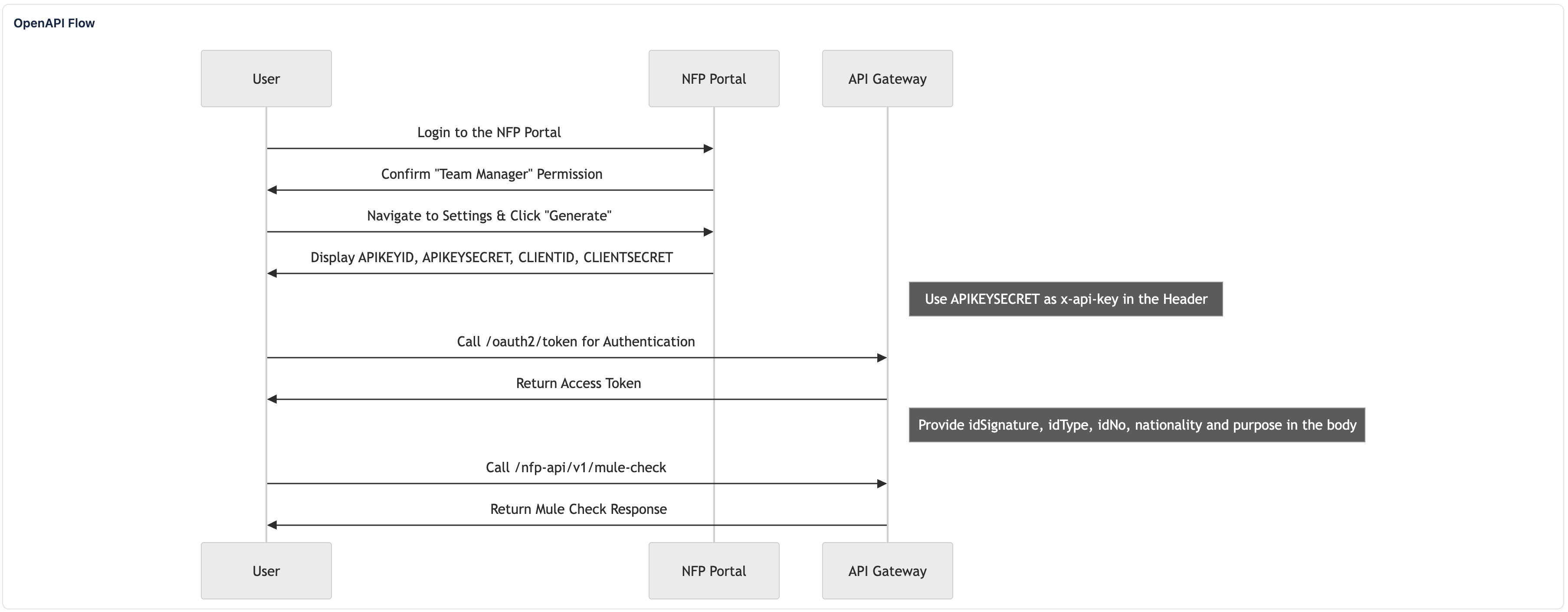
This document provides a comprehensive guide for onboarding to the NFP Public API platform. It details the process for generating API credentials, authenticating with the platform, and validating access through test endpoints. The guide is intended for technical teams responsible for integrating with the NFP Public API and assumes a basic familiarity with RESTful APIs and authentication mechanisms. The Sequence Diagram below is illustrating the service journey from request submission to getting response.
Prerequisites
Before proceeding, ensure the following prerequisites are met:
- You have access to the NFP Portal (UAT).
- Your user account is assigned the Team Manager role.
- You have a secure method for storing sensitive credentials.
Onboarding Workflow
Step 1: User Login
1. Navigate to the NFP Portal.
2. Log in using your assigned credentials.
3. Confirm that your account is assigned with the Team Manager role.
If not, contact the system administrator or the NFP Support Team at nfp-support@paynet.my to request the appropriate access level.
Step 2: Generate API Credentials
API credentials are sensitive and will be displayed only once.
Please copy and store them immediately in a secure password manager or any other secure storage solution.
1. After logging in, click your profile icon and navigate to the Settings section

2. Select the Client Credentials tab.

3. Click Generate button to create a new set of API credentials.
4. The system will display the following credentials one time only:
- APIKEYID
- APIKEYSECRET
- CLIENTID
- CLIENTSECRET
Make sure to store all values securely before leaving the page.

Step 3: Authentication
Before calling any Public API endpoint, you must first obtain an Access Token using your API credentials. This token authorises your requests and must be included with every API call.
Obtain Access Token
Use your CLIENTID and CLIENTSECRET to request a new access token.
Endpoint
POST https://openapi.nfp.uat.inet.paynet.my/oauth2/token
Headers
x-api-key: <APIKEYSECRET>
Request Body
{
  "username": "<CLIENTID>",
  "password": "<CLIENTSECRET>"
}
Sample Response
{
  "AuthenticationResult": {
    "AccessToken": "eyJraWQiOiJmRzZ6Z25YOGcz...m8Jd6Jg",
    "ExpiresIn": 3600,
    "IdToken": "eyJraWQiOiJ2b2NYUThOcFdqWDJXVDMzdE...AiHBlre2yZzQ",
    "RefreshToken": "eyJjdHkiOiJKV1QiLCJlbmMiOiJBM...ma_RvA",
    "TokenType": "Bearer"
  },
  "ChallengeParameters": {}
}
Refresh Token
When your access token expires, you can request a new one using the Refresh Token provided in the initial response.
Endpoint
POST https://openapi.nfp.uat.inet.paynet.my/oauth2/token/refresh
Headers
x-api-key: <APIKEYSECRET>
Request Body
{
  "refreshToken": "<RefreshToken>"
}
Sample Response
{
  "AuthenticationResult": {
    "AccessToken": "eyJraWQiOiI4RHZLU2JLSHdlQXh...u5O7zNw",
    "ExpiresIn": 3600,
    "IdToken": "yJraWQiOiJEbzJPM1ZnREpYdTUrQ3...SfnkQNT1ukLEg",
    "TokenType": "Bearer"
  },
  "ChallengeParameters": {}
}
Step 4: API Validation
After obtaining your access token, validate your connectivity and credentials by calling the testing and functional endpoints.
Ping Endpoint (Connectivity Check)
Verify your credentials and token by calling the Ping endpoint.
Use the Ping endpoint to confirm that your authentication token is valid and that you can successfully connect to the Public API.
Endpoint
GET https://openapi.nfp.uat.inet.paynet.my/nfp-api/v1/server/ping
Headers
authorization: Bearer <AccessToken>
Sample Response:
{
  "message": "pong"
}
Mule Check Endpoint
Use this endpoint to validate an individual's identification information.
Endpoint
GET https://openapi.nfp.uat.inet.paynet.my/nfp-api/v1/server/mule-check
Headers
authorization: Bearer <AccessToken>
Request Body Parameters
| Key | Required | Description |
|---|---|---|
| idSignature (string) | Mandatory | SHA256 signature of idNo and idType |
| idType (string) | Mandatory | mykad - Malaysian Identity Card. passport - Passport. bric - BRIC. police_id - Police ID. army_id - Army ID. |
| idNo (string) | Mandatory | The id number of the person |
| nationality (string) | Conditional | ONLY required for passport and bric. Use the two-letter ISO 3166-1 alpha-2 nationality code (e.g., MY for Malaysian, SG for Singaporean). |
| purpose (string) | Mandatory | 01 - Account Opening 02 - CDD 03 - Database Update |
For example,
| ID Type | Sample Request |
|---|---|
| Passport | |
| MyKad | |
Sample Responses
| Response Code | Sample Response |
|---|---|
| 200 Success | For passport and bric ID types, the nationality field is required. In the response, the nationality returned corresponds to the value used in the search query to validate the individual. It does not represent all nationalities associated with the person.mykad, police_id, army_id), the response will NOT include a nationality field.200 status, and isMuleIdFlagged returns false, without the muleCheck object. |
| 403 Forbidden | Application Level |
| 400 Bad Request | |
| 400 Bad Request | |
| 400 Bad Request | |
| 401 Unauthorized | |
Appendix
Revised Mule Flag Indicator
The new isMuleIdFlagged field will indicate the mule flag outcome as follows. This allows Participants to determine the mule flag outcome directly from the response body, instead of relying on HTTP status codes to interpret business outcomes.
| Mule ID Check Outcome | isMuleIdFlagged Value |
|---|---|
| ID matched as the below: T1 - Confirmed T2 - Suspected T3 - Watchlist | true |
| ID matches as the below: T4 - Reference Only | false |
| ID not found in PayNet's mule records | false |
Nationality Codes & Phone Code
Note: The nationality field is mandatory for passport and bric ID types.
Use the two-letter ISO 3166-1 alpha-2 country code.
Below is the list of supported nationality codes (Version: 1.0):
| Nationality | Code | Phone Code |
|---|---|---|
| Afghan | AF | +93 |
| Albanian | AL | +355 |
| Algerian | DZ | +213 |
| American | US | +1 |
| Andorran | AD | +376 |
| Angolan | AO | +244 |
| Antiguans or Barbudans | AG | +1268 |
| Argentinean | AR | +54 |
| Armenian | AM | +374 |
| Australian | AU | +61 |
| Austrian | AT | +43 |
| Azerbaijani | AZ | +994 |
| Bahamian | BS | +1242 |
| Bahraini | BH | +973 |
| Bangladeshi | BD | +880 |
| Barbadian | BB | +1246 |
| Belarusian | BY | +375 |
| Belgian | BE | +32 |
| Belizean | BZ | +501 |
| Beninese | BJ | +229 |
| Bhutanese | BT | +975 |
| Bolivian | BO | +591 |
| Bosnian or Herzegovinian | BA | +387 |
| Brazilian | BR | +55 |
| British | GB | +44 |
| Bruneian | BN | +673 |
| Bulgarian | BG | +359 |
| Burkinabe | BF | +226 |
| Burmese | MM | +95 |
| Burundian | BI | +257 |
| Cambodian | KH | +855 |
| Cameroonian | CM | +237 |
| Canadian | CA | +1 |
| Cape Verdean | CV | +238 |
| Central African | CF | +236 |
| Chadian | TD | +235 |
| Chilean | CL | +56 |
| Chinese | CN | +86 |
| Colombian | CO | +57 |
| Comoran | KM | +269 |
| Congolese | CG | +242 |
| Costa Rican | CR | +506 |
| Croatian | HR | +385 |
| Cuban | CU | +53 |
| Cypriot | CY | +357 |
| Czech | CZ | +420 |
| Danish | DK | +45 |
| Djibouti | DJ | +253 |
| Dominican | DO | +1809 |
| Dutch | NL | +31 |
| East Timorese | TL | +670 |
| Ecuadorean | EC | +593 |
| Egyptian | EG | +20 |
| Emirian | AE | +971 |
| Equatorial Guinean | GQ | +240 |
| Eritrean | ER | +291 |
| Estonian | EE | +372 |
| Ethiopian | ET | +251 |
| Fijian | FJ | +679 |
| Filipino | PH | +63 |
| Finnish | FI | +358 |
| French | FR | +33 |
| Gabonese | GA | +241 |
| Gambian | GM | +220 |
| Georgian | GE | +995 |
| German | DE | +49 |
| Ghanaian | GH | +233 |
| Greek | GR | +30 |
| Grenadian | GD | +1473 |
| Guatemalan | GT | +502 |
| Guinea-Bissauan | GW | +245 |
| Guinean | GN | +224 |
| Guyanese | GY | +592 |
| Haitian | HT | +509 |
| Honduran | HN | +504 |
| Hungarian | HU | +36 |
| I-Kiribati | KI | +686 |
| Icelander | IS | +354 |
| Indian | IN | +91 |
| Indonesian | ID | +62 |
| Iranian | IR | +98 |
| Iraqi | IQ | +964 |
| Irish | IE | +353 |
| Israeli | IL | +972 |
| Italian | IT | +39 |
| Ivorian | CI | +225 |
| Jamaican | JM | +1876 |
| Japanese | JP | +81 |
| Jordanian | JO | +962 |
| Kazakhstani | KZ | +7 |
| Kenyan | KE | +254 |
| Kittian and Nevisian | KN | +1869 |
| Kuwaiti | KW | +965 |
| Kyrgyz | KG | +996 |
| Laotian | LA | +856 |
| Latvian | LV | +371 |
| Lebanese | LB | +961 |
| Liberian | LR | +231 |
| Libyan | LY | +218 |
| Liechtensteiner | LI | +423 |
| Lithuanian | LT | +370 |
| Luxembourger | LU | +352 |
| Macedonian | MK | +389 |
| Malagasy | MG | +261 |
| Malawian | MW | +265 |
| Malaysian | MY | +60 |
| Maldivan | MV | +960 |
| Malian | ML | +223 |
| Maltese | MT | +356 |
| Marshallese | MH | +692 |
| Mauritanian | MR | +222 |
| Mauritian | MU | +230 |
| Mexican | MX | +52 |
| Micronesian | FM | +691 |
| Moldovan | MD | +373 |
| Monacan | MC | +377 |
| Mongolian | MN | +976 |
| Moroccan | MA | +212 |
| Mosotho (Losotho) | LS | +266 |
| Motswana (Batswana) | BW | +267 |
| Mozambican | MZ | +258 |
| Namibian | NA | +264 |
| Nauruan | NR | +674 |
| Nepalese | NP | +977 |
| New Zealander | NZ | +64 |
| Nicaraguan | NI | +505 |
| Nigerian | NG | +234 |
| Nigerien | NE | +227 |
| Northern Irish | GB | +44 |
| North Korean | KP | +850 |
| Norwegian | NO | +47 |
| Omani | OM | +968 |
| Pakistani | PK | +92 |
| Palauan | PW | +680 |
| Panamanian | PA | +507 |
| Papua New Guinean | PG | +675 |
| Paraguayan | PY | +595 |
| Peruvian | PE | +51 |
| Polish | PL | +48 |
| Portuguese | PT | +351 |
| Qatari | QA | +974 |
| Romanian | RO | +40 |
| Russian | RU | +7 |
| Rwandan | RW | +250 |
| Saint Lucian | LC | +1758 |
| Salvadoran | SV | +503 |
| Samoan | WS | +685 |
| San Marinese | SM | +378 |
| Sao Tomean | ST | +239 |
| Saudi | SA | +966 |
| Scottish | GB | +44 |
| Senegalese | SN | +221 |
| Serbian | RS | +381 |
| Seychellois | SC | +248 |
| Sierra Leonean | SL | +232 |
| Singaporean | SG | +65 |
| Slovakian | SK | +421 |
| Slovenian | SI | +386 |
| Solomon Islander | SB | +677 |
| Somali | SO | +252 |
| South African | ZA | +27 |
| South Korean | KR | +82 |
| Spanish | ES | +34 |
| Sri Lankan | LK | +94 |
| Sudanese | SD | +249 |
| Surinamer | SR | +597 |
| Swazi | SZ | +268 |
| Swedish | SE | +46 |
| Swiss | CH | +41 |
| Syrian | SY | +963 |
| Taiwanese | TW | +886 |
| Tajik | TJ | +992 |
| Tanzanian | TZ | +255 |
| Thai | TH | +66 |
| Togolese | TG | +228 |
| Tongan | TO | +676 |
| Trinidadian or Tobagonian | TT | +1868 |
| Tunisian | TN | +216 |
| Turkish | TR | +90 |
| Turkmen | TM | +993 |
| Tuvaluan | TV | +688 |
| Ugandan | UG | +256 |
| Ukrainian | UA | +380 |
| Uruguayan | UY | +598 |
| Uzbekistani | UZ | +998 |
| Venezuelan | VE | +58 |
| Vietnamese | VN | +84 |
| Yemenite | YE | +967 |
| Zambian | ZM | +260 |
| Zimbabwean | ZW | +263 |
Troubleshooting
| Error Code | Recommended Action |
|---|---|
| 403 Forbidden | Your account may not have the necessary permissions to access the API. Verify your access level, and contact the system administrator at if the issue persists. |
| 400 Bad Request | One or more required fields may be missing or incorrectly formatted. Check that all parameters are included and follow the expected data types and formats. |
| Token Issues | If you receive authentication-related errors: -Ensure your access token has not expired. -Confirm that you are using the correct CLIENTID, CLIENTSECRET, and API key. -Refresh the token if needed. |
| Credential Loss | API credentials cannot be recovered once generated. If they are lost or not recorded, generate a new set from the Client Credentials section in the National Fraud Portal. |
For further assistance, please contact the system administrator or the NFP Support Team at nfp-support@paynet.my.